Which HiSilicon SoC Families Fit Your Camera Needs?
You need the right HiSilicon SoC families for your camera setup. Entry-level models work well for basic home monitoring, whi
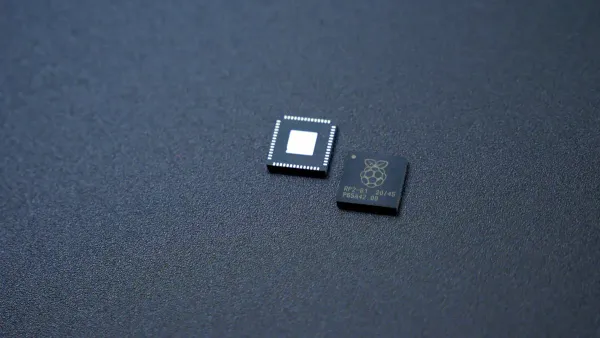
You need the right HiSilicon SoC families for your camera setup. Entry-level models work well for basic home monitoring, while mid-range chips handle more complex tasks in small businesses. High-end SoCs offer 4K video, low bit rates, and advanced noise reduction for demanding environments. Many chips support AI features, including facial recognition, object detection, and predictive analytics. You also get benefits like H.265 encoding for efficient compression, HDR processing, and compatibility with most networks.
Key Takeaways
- Choose entry-level SoCs like Hi3518 for basic home monitoring. They offer low power use and reliable video quality.
- Select mid-range models such as Hi3516 for small business security. They provide smart features and good performance.
- Opt for high-end SoCs like Hi3519 and Hi3535 for advanced surveillance. They support 4K video and AI functions for enhanced analytics.
- Check the encoding standards like H.265 for efficient storage. This helps save space while maintaining video quality.
- Use the comparison tables to match SoCs with your specific camera needs. This ensures you select the best fit for your project.
HiSilicon SoC Families Overview
Key Models
You will find several key models in the hisilicon soc families. Each model fits a different type of camera or recording device. The Hi3516 series works well for mid-range IP cameras. You get a processor with dual core cortex a9 architecture, which helps you run smart features and handle video streams smoothly. The Hi3518 series suits entry-level cameras. This processor uses less power and supports basic video tasks. The Hi3519 series gives you more advanced options. You can use it for cameras that need high resolution and AI functions. The Hi3535 model is popular for network video recorders (NVRs). It uses dual core cortex a9 technology and supports multiple video channels at once.
Tip: If you want to add smart features like face detection or motion alerts, look for models that support OpenIPC or smart vision platforms. These platforms help you unlock extra functions and improve your camera system.
Use Cases
You can match each model in the hisilicon soc families to a specific use case.
- Hi3516: Use this for small business security cameras. You get good video quality and reliable performance.
- Hi3518: Choose this for home monitoring or simple office setups. The processor handles basic tasks and saves energy.
- Hi3519: Pick this for advanced surveillance. You can use AI features and higher resolutions.
- Hi3535: Select this for NVRs in large buildings. You can connect many cameras and manage video streams easily.
You should also check the memory requirements for each model. Some cameras need more memory to store video clips or run smart features. If you want to upgrade your system, make sure your processor supports the latest video standards and AI functions.
Comparison Table
Specs
You can compare HiSilicon SoC families by looking at their main features. The table below shows the key specs for each family. This helps you see which chip fits your camera needs best.
| SoC Family | CPU | GPU | ISP Features | Encoding | Memory | Power Use | Extra Features |
|---|---|---|---|---|---|---|---|
| Hi3518E/C | ARM9 | None | Basic ISP, 3D noise reduction | H.264, 720p/1080p | DDR2 up to 512MB | Low | Edge enhancement, defogging |
| Hi3516A/D | Dual Cortex-A9 | Mali GPU | Advanced ISP, HDR, image enhancement | H.264/H.265, 1080p | DDR3/DDR4 | Medium | Smart vision, AI support |
| Hi3519V101 | Dual Cortex-A7 | Mali GPU | New ISP, high-res, AI image processing | H.264/H.265, 4K | DDR3/DDR4 | Medium | AI inference, object detection |
| Hi3535 | Dual Cortex-A9 | Mali GPU | Multi-channel ISP, enhanced video streams | H.264/H.265, 4K | DDR3/DDR4 | High | Multi-display, NVR support, rapid mass production |
Note: Some models, like Hi3516 and Hi3519, support H.265/HEVC encoding. This means you get better video quality with smaller file sizes. You also find AI features in mid-range and high-end chips.
Applications
You should pick a HiSilicon SoC based on what you want your camera to do.
- Hi3518E/C works well for home cameras or simple office setups. You get basic video and low power use.
- Hi3516A/D fits small business cameras. You can use smart features and get clear video.
- Hi3519V101 suits advanced cameras. You get 4K video, AI, and better image processing.
- Hi3535 is best for network video recorders. You can connect many cameras and manage lots of video streams.
If you want to add smart vision or AI, choose a model with those features. For fast production, Hi3535 gives you strong support and multi-display options. This table helps you match the right chip to your camera project.
Match Camera Needs
Choosing the right chip from the hisilicon soc families helps you get the best results for your camera project. You can match your needs to entry-level, mid-range, or high-end options. Each group offers different features, performance, and price points.
Entry-Level
If you want a simple and affordable camera, entry-level SoCs work best. These chips handle basic video tasks and use less power. You often see them in home security cameras or small office setups.
- Recommended Models: Hi3518E and Hi3518C
- Key Features:
- ARM9 or ARM926 processor core
- H.264 video encoding, MJPEG/JPEG support
- 1080p or 720p video at up to 25 frames per second
- Bitrate range from 16 kbit/s to 20 Mbit/s
- Low power use
| Specification | Hi3518E | Hi3518C |
|---|---|---|
| Processor Core | ARM9@Max. 440 MHz | ARM926 Max. 400 MHz |
| Video Encoding Protocols | H.264 main/baseline, MJPEG/JPEG | H.264 main/baseline, MJPEG/JPEG |
| Video Encoding Performance | 1080p@25fps, 720p@25fps | 1080p@25fps, 720p@25fps |
| Bitrate Range | 16 kbit/s to 20 Mbit/s | 16 kbit/s to 20 Mbit/s |
Hi3518E gives you improved performance and advanced ISP features. It also supports P2P cloud service, making remote access easier.
You can use these chips for basic monitoring where you do not need advanced AI or high resolution. They offer reliable video and easy setup.
Mid-Range
Mid-range SoCs from the hisilicon soc families give you more power and better video. You can use them for small businesses, schools, or places that need smart features. These chips support higher resolutions and sometimes include AI functions.
- Recommended Models: Hi3516A, Hi3516D, Hi3516C, Hi3516E, Hi3516AV100, Hi3516DV100, Hi3516CV300
- Key Features:
- ARM926 or Cortex-A9 processor
- H.265 and H.264 encoding
- 1080p or higher video at up to 30 frames per second
- Support for HDR and advanced image processing
- Some models offer AI support
| Model | Video Resolution | Encoding | Notable Features |
|---|---|---|---|
| Hi3516CV100/200 | 1080P@30fps+VGA@30fps | H.264 | Dual stream, smart vision |
| Hi3516EV100 | 1920x1080@20fps+720x576@20fps | H.265 | Low bit rate, efficient storage |
| Hi3516CV300 | 1080P@30fps+720@30fps | H.265 | Advanced ISP, HDR |
| Hi3516DV100 | 3M@30fps/4M@25fps/5M@15fps | H.265 | High resolution, AI support |
| Hi3516AV100 | 5M@30fps+VGA@30fps | H.265 | Enhanced image quality |
| Hi3516AV200 | 6M@30fps+VGA@30fps | H.265 | Higher megapixel support |
Hi3516A and Hi3516D give you strong performance for 1080p video. You get H.265 encoding, which saves storage space and keeps video quality high.
You can see how different models compare in the chart below:
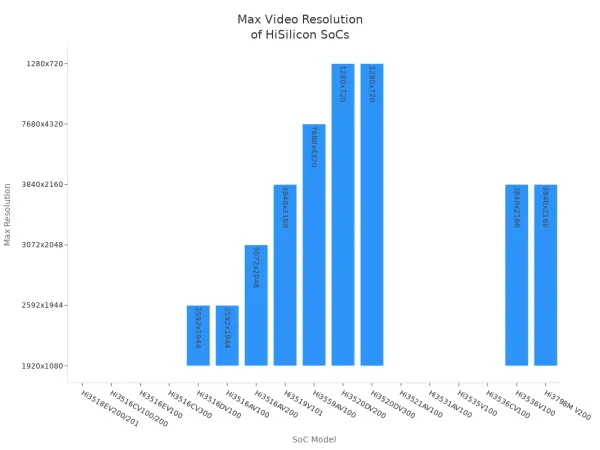
These chips fit well in places where you want smart detection, clear images, and smooth video. You can also use them for projects that need both live viewing and recording.
High-End
High-end SoCs give you the best features and performance. You can use them for advanced IP cameras, large NVRs, or places that need 4K video and AI analytics. These chips support multiple channels, high resolutions, and smart vision.
- Recommended Models: Hi3519V101, Hi3535
- Key Features:
- Dual Cortex-A9 or Cortex-A7 processor
- 4K video at up to 30 frames per second
- H.265/HEVC encoding for efficient storage
- Support for Sony IMX274 CMOS image sensor
- DOL-HDR for wide dynamic range
- Multi-channel video input and output
- Smart video analytics and advanced image processing
| Feature | Hi3519V101 / Hi3535 Description |
|---|---|
| Processor | Dual Cortex-A9 / Cortex-A7 |
| Video Resolution | 4K@30fps (Hi3519V101), up to 4K/UHD@60fps (Hi3535) |
| Image Sensor | Sony IMX274 CMOS, up to 320MP support |
| Dynamic Range | DOL-HDR, advanced ISP |
| Video Encoding Capability | 4K H.265/HEVC, multi-channel support |
| Smart Features | Hi-IVE analytics, multi-display, rapid mass production |
Hi3519V101 stands out for 4K video and DOL-HDR. Hi3535 supports many cameras at once, making it ideal for NVRs in large buildings.
You can use these chips for city surveillance, industrial monitoring, or any place that needs top-level video and analytics. They help you manage many streams and keep video quality high, even in tough conditions.
Video Capabilities
Resolution
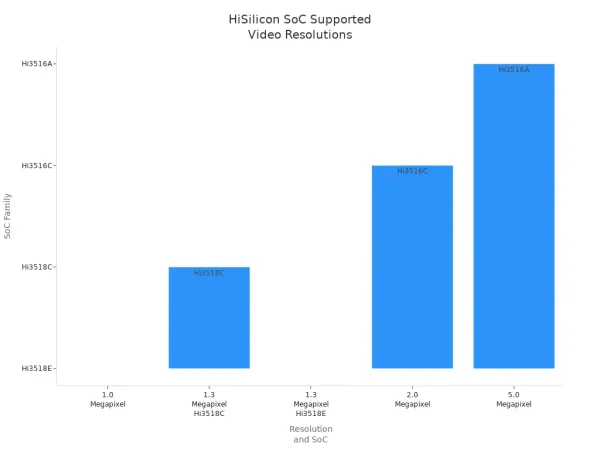
You want clear images from your camera system. HiSilicon SoCs support a wide range of display resolution options. You can choose models for basic monitoring or advanced surveillance. The table below shows popular SoCs and their supported video output resolutions. Some chips work with 1.0 or 1.3 megapixel sensors, while others reach up to 5.0 megapixels. You get flexibility for different video input needs.
| Resolution | SoC | Image Sensor | Remark |
|---|---|---|---|
| 1.0 Megapixel | Hi3518E | OV9712 | Support PoE / doesn't support Audio I/O |
| 1.3 Megapixel | Hi3518C | AR0130 | Support PoE/ Audio I/O / can support WiFi |
| 1.3 Megapixel | Hi3518E | AR0130 | Support PoE/ Audio I/O |
| 2.0 Megapixel | Hi3516C | IMX222 | Support PoE/ Audio I/O / can support WiFi |
| 5.0 Megapixel | Hi3516A | N/A | Based on H.265/HEVC architecture |
You can see the range of video output resolutions in the chart below:
Encoding
You need efficient compression for your video streams. HiSilicon SoCs offer advanced encoding standards. Many models use H.265/HEVC, which gives you high-quality video output with smaller file sizes. This helps you save storage and bandwidth. The table below lists SoCs with strong encoding abilities.
| SoC Model | Video Encoding Capability | Compression Standard |
|---|---|---|
| Hi3516CV300 | 1920x1080@25/30fps | H.265/HEVC |
| Hi3519 | 4K UHD | H.265/HEVC |
You get smooth video output and reliable video input for both live viewing and recording. These chips help you keep your system efficient and modern.
Frame Rate
You want smooth motion in your video output. HiSilicon SoCs support high frame rates for different applications. Some chips handle 8K video at 30 frames per second. Others support 4K video output at up to 120 frames per second. For 1080p video, you can reach 120 frames per second. The table below shows maximum frame rates for each application.
| Camera Application | Maximum Frame Rate | Resolution |
|---|---|---|
| 8K Video | 30 fps | 8K |
| 4K Video | 120 fps | 4K |
| 1080p Video | 120 fps | 1080p |
Some advanced models, like HiSilicon Hi3559A, give you AI inference for video processing. You get a penta-core architecture and a neural network engine. This chip supports smart cameras with 8Kp30 and 4Kp120 video output. You can use these features for facial recognition and object detection.
Tip: If you want the best video output and smart analytics, choose SoCs with AI capabilities and high frame rates.
Network Video Recorder & HiSilicon Hi3535
NVR Features
You want a reliable network video recorder for your security system. The hisilicon hi3535 SoC gives you strong performance and flexibility. You can connect up to 32 IP cameras at once. This chip supports different resolutions, including 5MP, 4MP, and 1080p. You get smooth video streams and clear images. The hisilicon hi3535 uses an A9 core processor, which helps you manage many video channels without lag.
You can store large amounts of video with support for four SATA hard drives. Each drive can hold up to 6TB. You also get e-SATA for extra storage. The hisilicon hi3535 supports H.264 video compression, so you save space and keep high quality. You can use USB 3.0 for fast data transfer. The chip includes a built-in audio codec for two-way audio intercom. You can talk to people through your cameras.
The table below shows key features of the hisilicon hi3535 for NVR systems:
| Feature | Description |
|---|---|
| Processor | A9 core for fast performance |
| Video Decoding | 5 channels at 1080p (4 preview, 1 playback) |
| Video Compression | H.264 for efficient storage |
| USB Support | USB 3.0 and USB 2.0 for quick data transfer |
| Audio Codec | Built-in for audio processing |
| Network Interface | Two gigabit ethernet ports (2x RJ45) for strong connectivity |
| Channel Support | Up to 8 HD channels, 32 IP camera inputs |
| Storage | 4 SATA HDDs (up to 6TB each), e-SATA expansion |
| Video Management | Embedded VMS for easy surveillance |
| Compatibility | Works with AHD/TVI/CVI DVR products |
You can use the hisilicon hi3535 in advanced network video recorder systems. You get multiple recording modes, including motion detection and privacy mask. The chip supports incoming bandwidth up to 100Mbps. You can connect security sensors, alarm systems, and access control devices.
Multi-Display
You need flexible display options for your NVR setup. The hisilicon hi3535 supports HDMI and VGA outputs. You can view live video on different screens at the same time. This helps you monitor several areas without switching devices. You can use multi-display to show up to 32 camera feeds. The chip handles high-definition video output, so you see clear images on every monitor.
- You can connect HDMI and VGA monitors for multi-display.
- You can view 8 channels at 5MP, 16 channels at 4MP, or 32 channels at 24fps.
- You get support for two gigabit ethernet ports for fast and stable network connections.
The table below highlights multi-display capabilities:
| Feature | Description |
|---|---|
| Video Input | 32 IP camera channels |
| Multi-Display | HDMI and VGA outputs |
| Resolution | Up to 1920x1080 on each display |
You can use the hisilicon hi3535 to build a network video recorder that supports advanced monitoring. You get easy integration with home automation, alarm systems, and video intercoms. This chip helps you create a complete security solution for homes, businesses, or industrial sites.
Real-World Applications
Residential
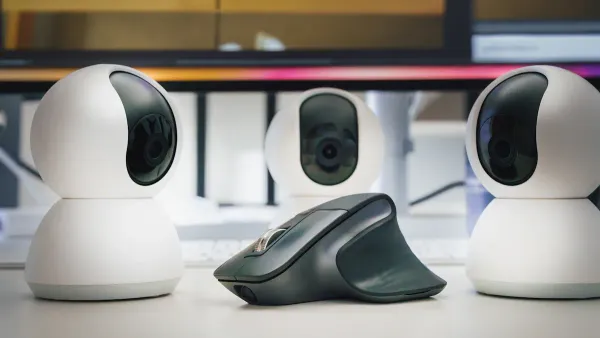
You can use HiSilicon SoC-based IP cameras to make your home safer and smarter. Many families want affordable and efficient HD cameras for DIY security. These chips fit inside compact cameras that work well with smart home systems. You get features like remote monitoring, smartphone integration, and motion detection. You can check your home from anywhere using your phone. If someone moves near your door, the camera sends an alert. More people care about home security and want to watch their homes during emergencies. HiSilicon SoCs help you set up cameras that are easy to install and use.
- Smart home security systems
- DIY HD IP cameras for apartments and houses
- Remote monitoring with mobile apps
- Motion detection and instant alerts
- Integration with smart devices and voice assistants
OpenIPC lets you add extra functions, such as cloud storage and advanced motion alerts, to your residential cameras.
Commercial
You find HiSilicon SoCs in many commercial security camera installations. These chips give your cameras the power to run advanced features like video analytics, motion detection, and face recognition. Your cameras can make real-time decisions about what to record and how to process data. Many businesses use these cameras to protect offices, stores, and schools. By 2015, HiSilicon SoCs powered 60% of all IP cameras worldwide. Manufacturers trust these chips to boost camera performance and reliability. You can use smart vision features to track visitors, prevent theft, and manage access control.
Smart vision platforms help you add facial recognition and people counting to your commercial cameras.
Industrial
You can rely on HiSilicon SoC-based cameras for tough industrial jobs. These cameras help you monitor production lines and keep workers safe in manufacturing plants. High-resolution video helps you spot problems and improve quality. Warehouses and logistics centers use these cameras to track inventory and watch over staff. You can connect cameras to warehouse management systems for better control and loss prevention. In the oil and gas industry, cameras with rugged designs and advanced analytics watch over offshore platforms and refineries. You get better safety and smoother operations.
- Monitoring production lines and worker safety
- Security and inventory tracking in warehouses
- Surveillance of critical infrastructure in oil and gas sites
- Integration with industrial management systems
- Advanced analytics for process optimization
You can use OpenIPC to upgrade industrial cameras with smart alerts and remote access features.
Decision Checklist
Key Factors
You want to pick the best HiSilicon SoC for your camera project. You should focus on a few important factors before you decide. Here is a quick table to help you compare what matters most:
| Factor | Why It Matters | What To Look For |
|---|---|---|
| Video Resolution | Higher resolution gives clearer images | 720p, 1080p, 4K |
| Encoding Standard | Efficient encoding saves storage and bandwidth | H.264, H.265/HEVC |
| AI Features | Smart functions add value to your system | Face detection, motion alerts |
| Power Consumption | Lower power use means less heat and longer life | Entry-level chips for low power |
| Channel Support | More channels allow more cameras | NVRs need multi-channel support |
| Price | Budget affects your choice | Entry, mid, or high-end models |
Tip: You should always check if the SoC supports the latest video standards and smart vision features. This helps future-proof your system.
Selection Steps
You can follow these steps to choose the right HiSilicon SoC for your needs:
-
Define Your Use Case
Decide if you need cameras for home, business, or industrial use.
Entry-level chips work for simple monitoring.
Mid-range chips fit small businesses or schools.
High-end chips suit advanced surveillance or NVRs. -
Set Your Video Requirements
Choose the resolution and frame rate you want.
Pick H.265/HEVC encoding for better storage efficiency. -
Check for Smart Features
Look for AI support if you want face recognition or object detection. -
Count Your Channels
If you need to connect many cameras, select a chip with multi-channel support. -
Review Power and Budget
Entry-level chips save energy and cost less.
High-end chips offer more features but use more power. -
Compare Models
Use the tables above to match specs with your needs.
You can make a smart choice by following these steps. If you need more help, check datasheets or ask an expert. 😊
You now know which HiSilicon SoC families match entry-level, mid-range, and high-end camera needs.
- Hi3518 suits basic home setups.
- Hi3516 fits small businesses.
- Hi3519 and Hi3535 work for advanced systems and NVRs.
Use the comparison tables and checklist to guide your choice.
Tip: Check datasheets for detailed specs. Ask an expert if you need help with complex installations. You can build a reliable camera system with the right SoC.
FAQ
What is the difference between Hi3518 and Hi3516 SoCs?
Hi3518 works best for basic cameras at home. Hi3516 gives you better video quality and smart features for business use. You get more advanced image processing with Hi3516.
Can HiSilicon SoCs support AI features like face detection?
You can use some HiSilicon SoCs for AI tasks. Models like Hi3516 and Hi3519 support face detection and object tracking. You need to check if your camera firmware allows these features.
Tip: Look for OpenIPC support to unlock extra AI functions.
How many cameras can I connect to a Hi3535-based NVR?
You can connect up to 32 IP cameras to a Hi3535-based NVR. This chip manages many video streams at once. You get smooth performance for large security systems.
Do HiSilicon SoCs work with wireless cameras?
You can use HiSilicon SoCs in wireless cameras. Some models support WiFi modules. You need to check the camera specifications to make sure wireless features are available.
| SoC Model | Wireless Support |
|---|---|
| Hi3518C | Yes |
| Hi3516C | Yes |
| Hi3519 | No |