Choosing the Right Ascend AI Accelerator for Edge Inference
You face many choices when selecting Ascend AI Accelerators for edge inference. You must match your application’s needs for
You face many choices when selecting Ascend AI Accelerators for edge inference. You must match your application’s needs for performance, power, and cost with the right hardware features. Edge AI is growing fast. The global market reached $20.78 billion in 2024 with a 21.7% CAGR. Many applications now require response times under 50 milliseconds. Real-time ai inference matters for smart cameras, vehicles, and robots. Ascend AI Accelerators work with both edge and cloud systems, giving you flexibility. You will find many models. Each one fits different tasks such as image analysis, large language models, or tough environments.
| Metric | Value |
|---|---|
| 2024 Valuation | $20.78 billion |
| Growth Rate | 21.7% CAGR |
| Performance Requirement | Sub-50ms response times |
Tip: Focus on your use case and environment to find the best fit.
Key Takeaways
- Identify your application needs first. Focus on performance, power, and cost to choose the right Ascend AI Accelerator.
- Consider the form factor of the accelerator. Select a size that fits your deployment environment, whether it's compact for drones or larger for data centers.
- Evaluate power efficiency. Choose accelerators that minimize energy use to lower costs and extend device life, especially for edge applications.
- Check compatibility with software frameworks. Ensure your AI models work seamlessly with popular tools like TensorFlow and PyTorch to avoid integration issues.
- Test your AI models on the selected hardware. This step ensures that the performance meets your speed and accuracy requirements before full deployment.
Ascend AI Accelerators Overview
Product Family
You can find many options in the Ascend AI Accelerator lineup. These platforms help you run ai tasks at the edge and in the cloud. Each product family has a special role. Some platforms focus on edge inference, while others support cloud-based ai workloads.
| Product Family | Primary Role in Edge and Cloud Inference |
|---|---|
| Ascend AI processors | Core chip layer in the full stack, scalable architecture |
| Atlas AI computing | Provides various product form factors for AI infrastructures |
| Atlas 200 AI module | Designed for edge applications |
| Atlas 300 AI card | Used in cloud environments |
| Atlas 500 AI station | Targets edge computing solutions |
| Atlas 800 AI servers | Supports cloud-based AI applications |
You can use these platforms to build flexible ai solutions. Ascend ai accelerators give you the power to process data quickly. You can choose the right platforms for your needs, whether you want to run ai at the edge or in the cloud.
Edge and Cloud Integration
Ascend ai accelerators work well with both edge and cloud platforms. You can deploy ai models on different devices and get fast results. Some accelerators are small and fit into compact systems. Others work in large servers for heavy ai workloads.
Here are some key models and devices you might use for edge inference:
- Ascend 310: This chip is part of the Atlas range. You can use it for many ai applications.
- Atlas 200: This compact ai accelerator module delivers up to 16 teraflops of computing power. It uses only 8 to 13.8 watts.
- Atlas 500: This edge solution provides 16 teraflops (INT8) or 8 teraflops (FP16). It supports real-time processing and uses 25 to 40 watts.
You can mix and match these platforms to fit your project. Ascend ai accelerators help you build smart systems that respond quickly. You can run ai tasks on the edge for fast results or send data to the cloud for deeper analysis.
Note: You should always check the power and performance of each accelerator before you choose a platform. This helps you get the best results for your ai application.
AI Inference at the Edge
Real-Time Inference
You need fast and reliable responses for many modern applications. AI inference at the edge lets you process data close to where it is created. This approach brings several important benefits:
- Real-time processing: You get immediate results because the device handles data locally. This is critical for real-time ai inference in smart cameras, autonomous vehicles, and healthcare monitoring.
- Privacy and security: You keep sensitive information on the device, which lowers the risk of data leaks during transmission.
- Bandwidth efficiency: You send less data to the cloud, which saves network resources and reduces costs. This helps in remote areas with limited connectivity.
- Scalability: You can add more edge devices as your needs grow. This does not overload your central systems.
- Energy efficiency: Edge devices use less power because they avoid constant data transmission.
- Offline operation: Your ai inference can keep working even if the internet connection drops.
Tip: Real-time ai inference at the edge reduces latency. You get faster decisions and better user experiences.
Hardware Acceleration
You can boost ai inference performance with hardware acceleration. Special chips like GPUs handle many tasks at once. This makes real-time processing possible for demanding ai workloads. You see this in action with real-time video analytics for security, predictive maintenance in factories, and automated quality checks in manufacturing.
Hardware acceleration lets you analyze data quickly and make decisions without waiting for cloud servers. This reduces latency and keeps your information private. You also improve energy use and support more ai workloads on each device. With the right optimization, you can run complex inference tasks smoothly and reliably.
Note: Hardware acceleration is key for real-time ai inference. It helps you meet strict latency requirements and handle heavy ai workloads at the edge.
Selection Criteria
Choosing the right Ascend AI accelerator for edge inference means you must look at several important factors. You want to make sure your ai applications run smoothly and meet your goals for cost, energy efficiency, and performance. Here are the main criteria you should consider:
Performance
You need to match the performance of the accelerator to your ai applications. Some tasks, like image analysis or video inference, require high computing power. Others, such as simple sensor data processing, need less. You should check the number of teraflops, memory bandwidth, and supported data types. Fast inference helps your applications respond in real time. If you work with large language models or complex ai workloads, you need an accelerator with strong performance. You should also look at how well the accelerator handles multiple tasks at once.
Tip: Always test your ai models on the target hardware to see if the inference speed meets your requirements.
Power Efficiency
Energy efficiency is critical for edge deployments. You want your ai applications to run for long periods without overheating or draining batteries. The Ascend 910C stands out for its power efficiency. It uses about 310W, which helps lower the total cost of ownership. Other accelerators, like the NVIDIA H100, offer more raw performance but use much more energy. You should compare the energy use of each accelerator and pick one that fits your deployment needs. Lower energy consumption means less heat and longer device life.
- Ascend 910C offers strong energy efficiency for edge inference.
- Lower energy use helps reduce cost and supports sustainable ai applications.
- High energy efficiency means you can deploy more devices without increasing your energy budget.
Form Factor
The form factor of the accelerator affects where you can deploy your ai applications. You need to choose a size and shape that fits your environment. Some accelerators are small and light, perfect for drones or cameras. Others are larger and work best in edge servers or data centers. The table below shows different form factors and their impact on deployment:
| Form Factor | Description | Deployment Impact |
|---|---|---|
| Atlas 200 AI accelerator | Compact module, half the size of a credit card, 10 watts power consumption | Ideal for devices like cameras and drones, enabling real-time HD video analytics. |
| Atlas 300 AI accelerator | HHHL PCIe standard card for data centers and edge servers | Supports multiple data precisions, delivering high performance for deep learning and inference tasks. |
| Atlas 500 AI edge station | Integrates AI processing in a set-top box size | Suitable for various applications including transportation and healthcare, with significant performance improvements. |
| Atlas 800 AI appliance | Optimized AI environment with pre-installed software | Ready to use quickly, integrates management software for enterprise AI applications, reducing entry barriers. |
You should pick a form factor that matches your deployment space and the needs of your ai applications.
Cost
Cost is a major factor when you select an accelerator for edge inference. You need to look at the price of the hardware, the energy cost, and the maintenance cost. Some accelerators cost more upfront but save money over time because of better energy efficiency. The Ascend 910C, for example, offers good power efficiency, which lowers the total cost of ownership. You should also consider the cost of software licenses and support. If you plan to scale your ai applications, you need to think about the cost of adding more accelerators.
- Hardware cost affects your budget for ai applications.
- Energy cost impacts long-term savings.
- Maintenance cost includes updates and repairs.
- Total cost of ownership combines all these factors.
Note: Always calculate the total cost before you decide on an accelerator. This helps you avoid surprises and keeps your ai applications running smoothly.
Compatibility
Compatibility with your existing hardware and software is essential. You want your ai applications to work with popular frameworks like TensorFlow and PyTorch. Ascend platforms support these frameworks, which makes integration easier. Huawei has open-sourced CANN to help developers move away from Western chipmakers. The ecosystem is still growing, so you may face some challenges. Huawei also provides adapters for PyTorch models on Ascend NPUs. This focus on interoperability helps you switch without losing support for your ai applications. MindSpore offers another option for building and managing ai workloads.
- Ascend supports TensorFlow, PyTorch, and MindSpore for ai applications.
- Open-source tools help you migrate your inference workloads.
- Compatibility reduces integration cost and speeds up deployment.
Tip: Check the compatibility of your ai models and software before you choose an accelerator. This saves you time and cost during deployment.
Matching Application Requirements
You should always match the selection criteria to your specific ai applications. If you work with image or video analysis, you need high performance and energy efficiency. For large language models, you need more memory and computing power. Environmental conditions also matter. Some accelerators work better in harsh or remote locations. You should list your requirements and compare them to the features of each accelerator.
- Real-time inference for cameras and drones needs compact, energy-efficient accelerators.
- Healthcare and transportation applications may need larger form factors and higher performance.
- Cost and compatibility affect how quickly you can deploy and scale your ai applications.
Remember: The best accelerator for your edge inference depends on your application needs, cost limits, energy efficiency goals, and compatibility with your existing systems.
Model Comparison
Choosing the right Ascend AI Accelerator for edge inference means understanding what each model offers. You want to match your application with the best hardware. Let’s look at four popular options: Ascend 310, Ascend 910C, Atlas 200, and Atlas 500 Pro.
Ascend 310
Ascend 310 gives you a balance of performance and efficiency. You can use it in many edge ai scenarios. This chip works well in small devices and supports real-time processing. It handles up to 200 faces or objects at once, making it great for security and monitoring.
| Use Case | Description |
|---|---|
| Security Cameras | Processes 200 faces or objects at the same time. Perfect for real-time monitoring. |
| Drones | Boosts autonomous features and supports various ai tasks. |
| Smart Autonomous Retail | Powers ai-driven solutions in retail, improving customer experience and efficiency. |
| Construction Site Monitoring | Helps construction companies track activities on-site. |
| Power Line Monitoring | Lets utility providers monitor power lines efficiently. |
You can deploy Ascend 310 in places where you need fast ai inference but have limited space or power. It fits well in smart cameras, drones, and retail systems.
Ascend 910C
Ascend 910C stands out for its high computational power and energy efficiency. You get up to 320 TFLOPS of FP16 performance. This chip uses about 310 watts, which is lower than many competing GPUs. It works well for deep learning and large ai models.
| Metric | Ascend 910C | NVIDIA NVL72 B200 |
|---|---|---|
| Power Consumption (per GPU) | 70%–80% of NVIDIA NVL72 | 100% |
| Overall Supernode Performance (FLOPS) | 70% higher than NVL72 | 100% |
| Power Consumption per FLOP | 2.3 times higher | 1.0 |
| Power Consumption per TB/s Memory Bandwidth | 1.8 times higher | 1.0 |
| Power Consumption per TB of HBM Memory Capacity | 1.1 times higher | 1.0 |
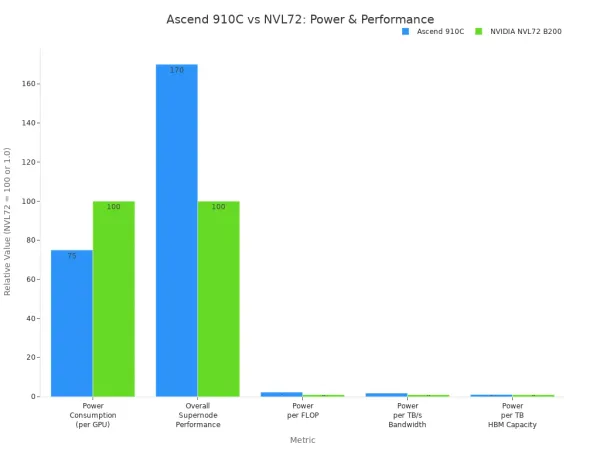
You can use Ascend 910C for demanding ai workloads. It fits best in edge servers or data centers where you need strong performance and lower energy costs. This model is ideal for training and running large ai models in real time.
Note: Ascend 910C competes with top GPUs like NVIDIA A100 and H100. You get high performance and save on energy.
Atlas 200
Atlas 200 is a compact ai accelerator module. It is about half the size of a credit card. You can use it in terminal devices such as cameras, robots, and drones. This module supports 16-channel real-time HD video analytics. You get strong ai processing in a small package.
- You can deploy Atlas 200 in cameras for smart surveillance.
- It works well in robots for real-time decision-making.
- Drones use Atlas 200 for ai-powered navigation and monitoring.
Atlas 200 handles tough environments. It works in temperatures from -20°C to 55°C and can handle shocks and vibrations. This makes it a good choice for outdoor or mobile ai applications.
| Environmental Factor | Specification |
|---|---|
| Storage Temperature | -30 to 60°C |
| Operating Temperature | -20 to 55°C ambient |
| Humidity | Operating: 20% ~ 80%, relative, non-condensing |
| Test | Standard | Parameters |
|---|---|---|
| Shock | DIN EN 60068-2-27 | Each axis (x/y/z), 20g, 11ms, +/- 10 shocks |
| Bump | DIN EN 60068-2-27 | Each axis (x/y/z), 20g, 11ms, +/- 100 bumps |
| Vibration (random) | DIN EN 60068-2-64 | Each axis (x/y/z), 4.9g rms, 15-500Hz, 0.05g2/Hz acceleration, 30min per axis |
| Vibration (sinusoidal) | DIN EN 60068-2-6 | Each axis (x/y/z), 10-58Hz: 1.5mm, 58-500 Hz: 10g, 1 oct/min, 1 hour 52 min per axis |
Tip: Atlas 200 is a strong choice for ai at the edge, especially in harsh or mobile environments.
Atlas 500 Pro
Atlas 500 Pro gives you a powerful edge ai solution in a set-top box size. You can use it for real-time video analytics, smart transportation, and healthcare. This device supports up to 16 teraflops (INT8) or 8 teraflops (FP16) of computing power. It uses between 25 and 40 watts, making it energy efficient.
You can deploy Atlas 500 Pro in places where you need strong ai performance but do not have room for large servers. It fits well in smart city projects, hospitals, and transportation hubs. You get reliable ai inference and easy integration with existing systems.
Key strengths of Atlas 500 Pro:
- Delivers high ai performance for edge applications.
- Supports real-time analytics for video and sensor data.
- Works in environments where space and power are limited.
Callout: Atlas 500 Pro helps you bring advanced ai to the edge without the need for bulky hardware.
When you compare these models, you see that each one fits different needs. Ascend 310 and Atlas 200 work best in small, mobile, or outdoor devices. Ascend 910C and Atlas 500 Pro give you more power for larger edge deployments. You should match your ai application to the right model for the best results.
Optimization
Model Compression
You can make your ai models run faster and use less memory by using model compression techniques. These methods help you deploy ai at the edge where resources are limited. Two popular techniques are:
- Quantization: This method reduces the precision of model weights. You get smaller models and faster inference.
- Knowledge Distillation: You train a smaller model to learn from a larger one. The smaller model keeps good performance but needs fewer resources.
Knowledge distillation lets you shrink your ai models. You transfer knowledge from a big teacher model to a small student model. This process helps you save memory and speed up inference on edge devices.
You should try these techniques if you want your ai applications to work well on small devices.
Power Management
You need to manage power carefully when you run ai at the edge. Devices like cameras and sensors often have limited battery life. You can use power-saving modes and schedule ai tasks during low-activity periods. Some Ascend AI Accelerators support dynamic voltage and frequency scaling. This feature lets you adjust power use based on workload. You can also monitor temperature and energy use to prevent overheating. Good power management helps you keep your ai systems running longer and more reliably.
Tip: Smart power management means your ai devices last longer and work better in tough environments.
Software Support
You have many software frameworks and tools to help you deploy ai on Ascend AI Accelerators. These tools make it easier to build, test, and optimize your models. The table below shows some popular options:
| Framework/Tool | Description |
|---|---|
| PyTorch | A dynamic computational graph framework ideal for rapid prototyping and experimentation. |
| TensorFlow | A versatile machine-learning system supporting multiple languages, widely used for various tasks. |
| MindSpore | Huawei's open-source framework optimized for Ascend AI processors, enhancing performance through co-design. |
| Apache MXNet | AWS's deep learning framework supporting multiple programming languages. |
| Caffe | A modular framework developed for easy extension of new data formats and network layers. |
| Deepytorch Inference | An inference accelerator for PyTorch models, enhancing performance through advanced techniques. |
| MindStudio 2.0 | A comprehensive tool for end-to-end AI development, simplifying the process for developers. |
You can choose the framework that fits your project best. MindSpore works well with Ascend processors and gives you extra performance. PyTorch and TensorFlow are good choices if you want flexibility and community support. MindStudio 2.0 helps you manage your ai development from start to finish.
Decision Checklist
Requirements Match
You need to make sure your application requirements fit the features of the Ascend AI Accelerator. Start by listing what your project needs. Think about speed, power, size, cost, and software support. Use the checklist below to guide your decision:
- Performance: Does your application need fast image or video analysis? Check the teraflops and memory bandwidth.
- Power Efficiency: Will your device run on battery or in a place with limited power? Look for low wattage models.
- Form Factor: Does your project need a small module or a larger edge station? Match the size to your deployment space.
- Cost: Can you afford the hardware and maintenance? Calculate the total cost, including energy and support.
- Compatibility: Will your software work with Ascend frameworks like TensorFlow, PyTorch, or MindSpore? Make sure your models run smoothly.
Tip: Write down your top three requirements. Use them to compare each Ascend model. This helps you focus on what matters most for your project.
| Requirement | Example Need | Ascend Feature to Match |
|---|---|---|
| Speed | Real-time video | High TFLOPS, fast memory |
| Power | Battery operation | Low wattage, efficient chip |
| Size | Drone or camera | Compact module |
| Cost | Budget limit | Low TCO, energy savings |
| Software | PyTorch support | Framework compatibility |
Selection Steps
Follow these steps to choose and deploy your Ascend AI Accelerator:
- Define your application goals. Write down what you want your AI system to do.
- List your technical needs. Include speed, power, size, cost, and software.
- Compare Ascend models. Use your checklist to match each model’s features.
- Test your AI model on the selected hardware. Check if it meets your speed and accuracy targets.
- Review power and cost. Make sure the device fits your budget and energy plan.
- Check software compatibility. Confirm your frameworks and tools work with the accelerator.
- Plan deployment. Decide where and how you will install the device.
- Monitor performance. Track results and adjust settings for best efficiency.
Note: You can repeat these steps for each new project. This process helps you choose the right accelerator every time.
You improve edge inference when you match your application needs with the right Ascend AI Accelerator. You see faster training, simpler models, and better detection rates.
| Feature | Description |
|---|---|
| Training Time | 75% reduction |
| Inference Speed | 32.99% increase |
| Detection mAP | 97.1% |
You should use this checklist:
- List your speed and power needs.
- Pick a model that fits your budget.
- Check software support.
- Plan for future upgrades.
Stay updated as edge AI evolves. New trends like AI co-processors, 5G, and IoT keep changing what you can do.
FAQ
What is an Ascend AI Accelerator?
You use an Ascend AI Accelerator to speed up AI tasks. It helps your device process data quickly. You get better performance for things like image analysis and video monitoring.
How do I know which Ascend model fits my project?
You list your needs for speed, power, size, and cost. You compare these needs to each model’s features. You pick the model that matches your requirements best.
Tip: Write down your top three needs before you choose.
Can I run PyTorch or TensorFlow on Ascend devices?
You can run PyTorch and TensorFlow on most Ascend devices. Huawei provides adapters and open-source tools. You check compatibility before you deploy your AI models.
| Framework | Supported on Ascend? |
|---|---|
| PyTorch | ✅ |
| TensorFlow | ✅ |
| MindSpore | ✅ |
Do Ascend AI Accelerators work in harsh environments?
You can use some Ascend models, like Atlas 200, in tough conditions. These devices handle heat, cold, shock, and vibration. You check the specifications for each model to make sure it fits your environment.
- Atlas 200: Works from -20°C to 55°C
- Handles shocks and bumps