USB 3.1 to USB Type-C Powers Your Devices Easily
You want your devices to work faster and charge more quickly. With usb 3.1 to usb type c, you get a simple connector that ma
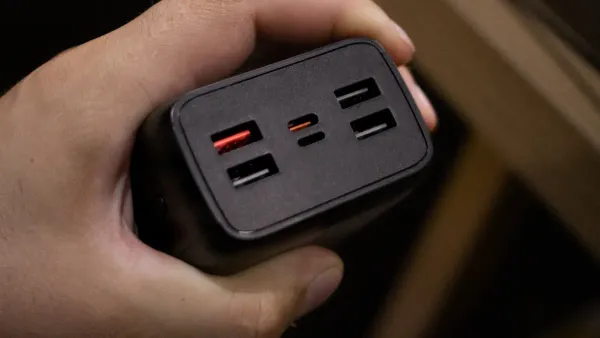
You want your devices to work faster and charge more quickly. With usb 3.1 to usb type c, you get a simple connector that makes a big difference. You can move large files in seconds, thanks to impressive real-world speeds.
| USB Version | Real-World Performance |
|---|---|
| USB 3.2 Gen 2×1 | Up to 800MBps |
| USB 3.0 | Up to 400MBps |
| USB 2.0 | Up to 60MBps |

You also find it easier to connect your phone, laptop, or even advanced electronic components. The connector fits either way, so you do not need to worry about plugging it in correctly. This small change helps both everyday users and those working with integrated circuits.
Key Takeaways
- USB 3.1 to USB Type-C offers data transfer speeds up to 10 Gbps, allowing you to move large files quickly and efficiently.
- The reversible design of USB Type-C makes it easy to connect devices without worrying about the orientation, enhancing user convenience.
- USB 3.1 to USB Type-C supports high power delivery, charging devices up to 240 watts, which reduces waiting time for your devices to power up.
- This technology is universally compatible, allowing one cable to connect various devices, simplifying your setup and reducing clutter.
- Using high-quality USB 3.1 to USB Type-C cables ensures optimal performance and protects your devices from potential damage.
What Is USB 3.1 to USB Type-C?
USB 3.1 Overview
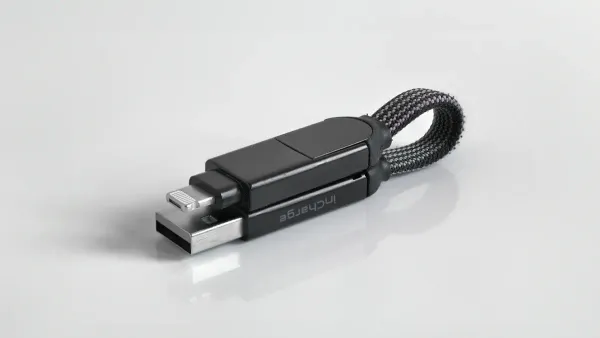
You see a big leap in speed and efficiency when you use USB 3.1. This version, now called USB 3.2 Gen 2x1, boosts data transfer rates up to 10 Gbps. Earlier standards like USB 3.0 only reached 5 Gbps. The table below shows how USB 3.1 compares to older versions:
| Specifications | Data Transfer Rates | Key Features |
|---|---|---|
| USB 3.0 | Up to 5 Gbps | SuperSpeed USB, full duplex, better power use |
| USB 3.1 Gen 1 | Up to 5 Gbps | Same as USB 3.0 |
| USB 3.1 Gen 2 | Up to 10 Gbps | SuperSpeed+, more efficient data encoding |
You get faster file transfers and smoother connections for devices like laptops, phones, and even integrated circuits in modern electronics.
USB Type-C Explained
USB Type-C changes how you connect devices. You no longer need to check which way the plug fits. The connector works both ways, making it easier for you. Here are some features that make USB Type-C stand out:
- Reversible design lets you plug in without guessing.
- Compact shape fits smaller devices and circuit boards.
- Supports higher data speeds, even up to 80 Gbps with newer standards.
- Delivers up to 240 watts, so you can charge bigger devices quickly.
You find USB Type-C on many new phones, laptops, and electronic components. This connector helps engineers build smaller and more powerful devices.
How They Work Together
When you combine USB 3.1 with USB Type-C, you unlock even more benefits. You get up to 10 Gbps data transfer and up to 100 watts of power delivery. This means you can charge your laptop, transfer large files, and connect displays all with one cable. You also enjoy a simple, reliable connection for integrated circuits and hubs.
Tip: Using usb 3.1 to usb type c cables in your projects makes your devices faster and more efficient. You save time and avoid frustration with easy connections.
You see these connections in everything from smartphones to advanced electronics. The usb 3.1 to usb type c standard helps you power, connect, and control devices with ease.
USB 3.1 to USB Type-C Benefits
Fast Data Transfer
You want your files to move quickly between devices. With usb 3.1 to usb type c, you double the speed of USB 3.0. You reach up to 10 Gbps, which means you can transfer large videos, photos, or project files in seconds. This speed helps you work faster and makes your devices more efficient.
| USB 3.1 Version | Maximum Theoretical Rate |
|---|---|
| Gen 1 | 5Gbps |
| Gen 2 | 10Gbps |
| USB Standard | Maximum Speed | Real-World Speed Approximation |
|---|---|---|
| USB 2.0 | 480 Mbps | N/A |
| USB 3.0 | 5 Gbps | ~500 MB/s |
| USB 3.1 | 10 Gbps | N/A |
| USB Type-C | 10 Gbps | N/A |
You see these speeds in action when you connect electronic components or integrated circuits that need fast data exchange. Engineers use usb 3.1 to usb type c to program and test circuits, saving time and reducing errors.
High Power Delivery
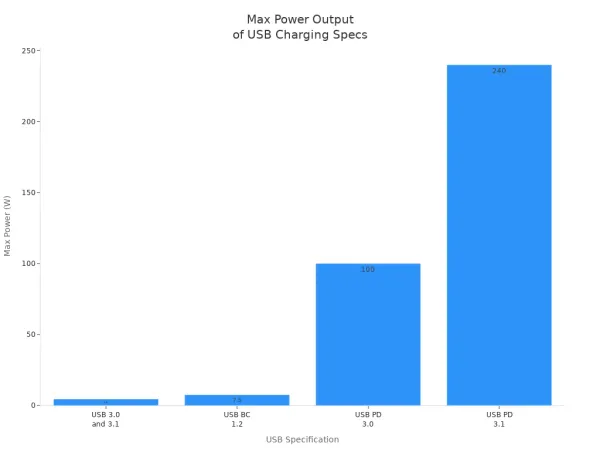
You need your devices to charge quickly and reliably. Usb 3.1 to usb type c supports much higher power levels than older USB types. You can charge laptops, tablets, and even some electronic components with up to 240 watts. This means you spend less time waiting for your devices to power up.
| Specification | Maximum Power | Maximum Voltage | Maximum Current |
|---|---|---|---|
| USB 3.0 and 3.1 | 4.5 W | 5 V | 900 mA |
| USB BC 1.2 | 7.5 W | 5 V | 1.5 A |
| USB PD 3.0 | 100 W | 5/9/15/20 V | 5 A |
| USB PD 3.1 | 240 W | 28/36/48 V | 5 A |
USB-C Power Delivery charges devices up to 70% faster than standard USB chargers. You reach full charge more quickly, which helps you stay productive.
You benefit from intelligent charging algorithms that protect your devices and components. Usb 3.1 to usb type c makes it easier to power integrated circuits and advanced electronics, supporting both high voltage and high current needs.
Universal Compatibility
You want one cable to work with many devices. Usb 3.1 to usb type c connects to laptops, tablets, smartphones, and electronic components. You do not need different cables for each device. This universal compatibility saves you money and reduces clutter.
USB 3.1 Type-C will be used on many popular computing devices including laptops, tablets and mobile devices.
- Usb 3.1 to usb type c maintains electrical compatibility with older USB standards.
- The connector design allows you to use legacy devices and new devices with the same cable.
- Engineers use these connections to link integrated circuits and test boards, making development easier.
You can connect displays, hubs, and accessories without worrying about compatibility. Usb 3.1 to usb type c supports both old and new standards, so you keep using your favorite devices.
Reversible Design
You do not want to struggle with plugging in cables. Usb 3.1 to usb type c features a reversible connector. You plug it in either way, and it works every time. This design makes your life easier and reduces wear on your devices.
- Users appreciate that with a USB-C cable, there’s no fumbling with the cord because it can be plugged in either way, eliminating incorrect insertion.
- The identical ends of the USB-C connector enhance user-friendliness by removing the frustration associated with orientation.
- The reversible design of USB-C connectors makes them more user-friendly, as users can plug them in without the hassle of determining the correct orientation.
| Connector Type | Durability Rating (Mating Cycles) | Power Rating |
|---|---|---|
| USB Type-C | 20,000 | 240W |
| Previous Types | Varies (typically lower) | Lower than 240W |
You get a connector that lasts longer and works better for electronic components and integrated circuits. Usb 3.1 to usb type c stands up to repeated use, making it ideal for both everyday devices and professional equipment.
Real-World Uses
Charging Devices
You use USB 3.1 to USB Type-C to charge many devices. Your laptop, tablet, and smartphone all benefit from faster charging. You plug in your cable, and your device powers up quickly. Engineers use these connections to supply power to electronic components and integrated circuits on test boards. You see USB Type-C ports on modern circuit boards because they deliver high power safely. This helps you work with advanced electronics and keep your devices ready for use.
Tip: Choose USB Type-C chargers for your projects. You get reliable power and protect your components from damage.
Connecting Displays
You connect your laptop to a monitor with a single USB Type-C cable. The connection sends video and audio signals at high speed. You do not need extra adapters or cables. Many integrated circuits support USB 3.1 to USB Type-C for display connections. You test new display modules and circuit boards using this standard. This makes your workspace cleaner and your setup easier.
| Device Type | Connection Benefit |
|---|---|
| Laptop | One cable for video + power |
| Circuit Board | Fast data for display tests |
| Tablet | Simple monitor connection |
Using Hubs and Accessories
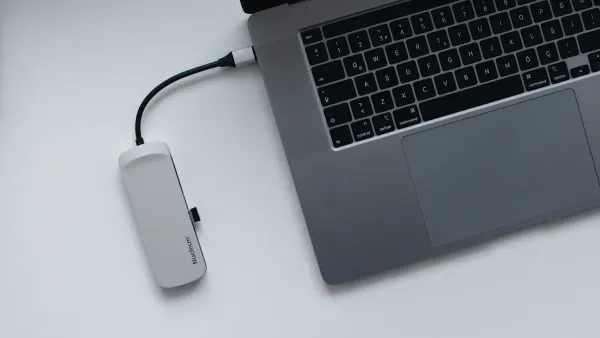
You expand your device’s capabilities with USB Type-C hubs. You plug in keyboards, mice, and storage drives. You use one port for many accessories. Engineers use USB 3.1 to USB Type-C hubs to connect multiple electronic components and integrated circuits during development. You test and program circuits with less hassle. The universal design helps you switch between devices and accessories without confusion.
- Connect multiple devices with one hub
- Test integrated circuits and boards easily
- Use fewer cables for a tidy workspace
You see USB 3.1 to USB Type-C making your daily tasks simpler. You power, connect, and control devices and components with ease.
Before Upgrading
Device Compatibility
You need to check if your devices support USB 3.1 to USB Type-C before you upgrade. Not every device or circuit board works with this standard. Many new laptops, tablets, and smartphones use USB Type-C ports, but some older models do not. If you work with electronic components or integrated circuits, you should look at the technical specifications. Some boards have USB Type-C connectors, but they may only support older USB speeds or power levels.
- Look for the USB Type-C symbol on your device.
- Check the user manual or product page for USB 3.1 or higher support.
- For integrated circuits, review the datasheet to confirm compatibility.
Tip: If your device only supports USB 2.0 or 3.0, you can still use a USB Type-C cable, but you will not get the full speed or power benefits.
You may need an adapter if your device has a different port. Some hubs let you connect USB Type-C to older USB-A ports, but these will limit performance. Always match the cable and port to the highest standard your device supports.
Cable Quality
You should choose high-quality cables when using USB 3.1 to USB Type-C. Not all cables deliver the same speed or power. Cheap or poorly made cables can slow down data transfer or even damage your devices and electronic components.
| Cable Feature | Why It Matters |
|---|---|
| Certified for USB 3.1 | Ensures fast data and safe charging |
| Shielded wires | Reduces interference |
| Strong connectors | Lasts longer with repeated use |
- Use cables from trusted brands.
- Look for certification labels like "USB-IF Certified."
- Avoid cables with missing or unclear specifications.
A good cable protects your integrated circuits and circuit boards from power surges and data errors. You keep your projects safe and your devices running smoothly.
You get the best results when you pair quality cables with compatible devices. This helps you enjoy all the benefits of USB 3.1 to USB Type-C, whether you charge your phone or connect advanced electronic components.
You see how usb 3.1 to usb type c connections make charging and connecting devices easier.
- You get faster data transfer for your files and projects.
- You power laptops, phones, and electronic components quickly.
- You use one cable for many devices, including integrated circuits and test boards.
Upgrading gives you speed, power, and simple connections. You prepare for the future of technology with reliable and universal solutions.
FAQ
Can you use USB 3.1 to USB Type-C for programming integrated circuits?
Yes, you can. USB 3.1 to USB Type-C cables transfer data quickly. You program integrated circuits faster and reduce errors. Many development boards now include USB Type-C ports for easy connections.
Does USB 3.1 to USB Type-C support high power for electronic components?
You get up to 240 watts with USB 3.1 to USB Type-C. This power supports advanced electronic components and integrated circuits. You charge devices and run test boards without worrying about low power.
Why do engineers prefer USB Type-C for circuit board testing?
Engineers choose USB Type-C because it offers fast data, high power, and a reversible connector. You connect test boards easily and avoid damaging pins. This makes your work faster and safer.
Will older devices work with USB 3.1 to USB Type-C cables?
You can use USB Type-C cables with older devices. However, you may not get full speed or power. Always check your device’s specifications. Some adapters help connect USB Type-C to older USB-A ports.
How does USB 3.1 to USB Type-C improve workspace organization?
- You use one cable for data, power, and accessories.
- You reduce clutter on your desk.
- You connect multiple electronic components and integrated circuits with a single hub.