Selecting Capacitors Made Easy with Size Chart Insights
You might feel overwhelmed when you look at capacitors in your electronics project. Many people get confused by the codes an
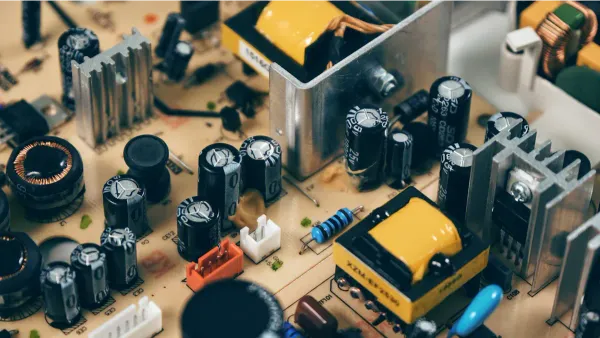
You might feel overwhelmed when you look at capacitors in your electronics project. Many people get confused by the codes and sizes printed on each capacitor. If you use a capacitor size chart, you can quickly choose the right part for your circuit. Several code systems help you figure out what you need:
- Capacitor Colour Codes, which were common for older unpolarised capacitors
- BS1852 Standard, now replaced by BS EN 60062 with letter or number codes
- Numerical Codes, using two or three numbers to show capacitance and sometimes tolerance
With a clear understanding of these codes and size charts, you can select capacitors with confidence.
Key Takeaways
- Use a capacitor size chart to quickly find the right capacitor for your project. This tool helps you match physical dimensions with your circuit's needs.
- Understand capacitor codes to select the correct part. Familiarize yourself with numeric, color, and polarity markings to avoid mistakes.
- Check voltage ratings and capacitance values before installation. Always choose capacitors rated higher than your circuit's maximum voltage for safety.
- Consider the size and type of capacitors for your application. Smaller capacitors work better in compact designs, while larger ones are ideal for filtering low-frequency signals.
- Always verify capacitor reliability ratings. Higher reliability classes ensure longer-lasting performance in demanding applications.
Capacitor Size Chart Basics
What Is a Capacitor Size Chart
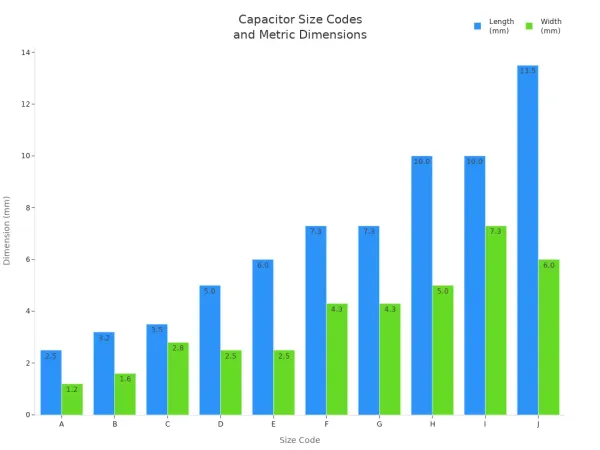
A capacitor size chart helps you find the right capacitor for your project. You use it as a capacitor value lookup tool. The chart lists the physical dimensions of different capacitors. Each size code matches a specific length and width. This makes it easy to compare common capacitor sizes and choose the best fit for your circuit.
Here is a table that shows the standard dimensions you might see in a typical capacitor size chart:
| Size Code | Metric Size (mm) | Imperial Size (inches) |
|---|---|---|
| A | 2.5 × 1.2 | 0.098″ × 0.047″ |
| B | 3.2 × 1.6 | 0.126″ × 0.063″ |
| C | 3.5 × 2.8 | 0.138″ × 0.110″ |
| D | 5.0 × 2.5 | 0.197″ × 0.098″ |
| E | 6.0 × 2.5 | 0.236″ × 0.098″ |
| F | 7.3 × 4.3 | 0.287″ × 0.169″ |
| G | 7.3 × 4.3 | 0.287″ × 0.169″ |
| H | 10.0 × 5.0 | 0.394″ × 0.197″ |
| I | 10.0 × 7.3 | 0.394″ × 0.287″ |
| J | 13.5 × 6.0 | 0.531″ × 0.236″ |
You can also use a chart to see the size differences at a glance:
Why Size Charts Matter
You need a capacitor size chart for more than just picking a part that fits. When you use a capacitor value lookup, you make sure the capacitor will work in your circuit. Different capacitor types have different size and value ranges. For example, ceramic capacitors are small and cover a range from a few picofarads to about 1-2 microfarads. Electrolytic capacitors give you large values in a small size. Film capacitors are bigger but can handle higher values.
| Capacitor Type | Size Characteristics | Capacitance Range |
|---|---|---|
| Ceramic | Small physical size, high dielectric constant | Few picofarads to 1-2 microfarads |
| Electrolytic | Small size for large capacitance values | Very large capacitance values |
| Film | Larger case sizes for lower capacitance | Higher capacitance values possible |
You use a capacitor value lookup to match the right size and value to your needs. This helps you avoid mistakes and keeps your electronic components safe. When you check a capacitor size chart, you make sure your capacitors fit and work as expected. This step is important for every lookup, especially when you design integrated circuits or work with space-limited boards.
SMD Capacitor Size Charts

MLCC Dimensions
When you work with electronic components, you often use SMD capacitor size charts to pick the right part for your circuit. These charts show you the package type and the exact dimensions for each capacitor. You can use this information to make sure your capacitor fits on your printed circuit board (PCB). Here is a table that lists common SMD capacitor sizes:
| SMD Package Type | Dimensions (mm) | Dimensions (inches) |
|---|---|---|
| 2920 | 7.4 x 5.1 | 0.29 x 0.20 |
| 2512 | 6.3 x 3.2 | 0.25 x 0.125 |
| 2010 | 5.0 x 2.5 | 0.20 x 0.10 |
| 1825 | 4.5 x 6.4 | 0.18 x 0.25 |
| 1812 | 4.6 x 3.0 | 0.18 x 0.125 |
| 1806 | 4.5 x 1.6 | 0.18 x 0.06 |
| 1210 | 3.2 x 2.5 | 0.125 x 0.10 |
| 1206 | 3.0 x 1.5 | 0.12 x 0.06 |
| 0805 | 2.0 x 1.3 | 0.08 x 0.05 |
| 0603 | 1.5 x 0.8 | 0.06 x 0.03 |
| 0402 | 1.0 x 0.5 | 0.04 x 0.02 |
| 0201 | 0.6 x 0.3 | 0.02 x 0.01 |
| 01005 | 0.4 x 0.2 | 0.016 x 0.008 |
You can also see the differences in size with this chart:

When you use SMD capacitor identification, you look at these codes and measurements to find the right fit. MLCC dimensions matter because they affect how much capacitance you get and how much voltage the capacitor can handle. If you increase the number of layers or use a material with a higher dielectric constant, you boost the capacitance. A thicker dielectric can raise the voltage rating but lower the capacitance. You need to balance these factors for your application.
Impact on Circuit Design
SMD capacitor size charts help you design circuits that work well and fit your space. The size of the capacitor affects its electrical performance, especially in high-frequency circuits. Smaller capacitors have lower parasitic inductance, higher self-resonant frequency, and lower impedance at high frequencies. Larger capacitors show higher inductance and impedance, which can limit performance.
| Capacitor Size | Parasitic Inductance | Self-Resonant Frequency | Impedance at High Frequencies |
|---|---|---|---|
| Larger | Higher | Lower | Higher |
| Smaller | Lower | Higher | Lower |
You need to use SMD capacitor identification to choose the right size for your PCB. In compact designs, every millimeter counts. Smaller capacitors let you use space more efficiently and keep your board organized. You can match the right capacitor to your needs by checking the chart and thinking about your circuit’s requirements.
Tip: Always check the SMD capacitor size charts before you select a part. This helps you avoid mistakes and ensures your capacitors work as expected.
Understanding Capacitor Codes
Marking Codes Explained
You see many different capacitor marking codes when you look at capacitors in electronic circuits. These codes help you identify the type, value, and rating of each capacitor. Manufacturers use several systems to make this process easier for you. Here is a table that shows the most common types of codes you will find:
| Type of Code | Description |
|---|---|
| Numeric/Alphanumeric | Codes may include letters for tolerance (like 'K' for ±10%) and numbers for voltage (such as '16' for 16V). |
| Color Codes | Older capacitors use colors to show digits or multipliers (brown for 1, black for 0). |
| EIA Capacitor Codes | SMD capacitors often use a letter and number to show capacitance and multiplier (for example, 'A5' means 100,000 pF). |
| Polarity Markings | Polarized capacitors have a stripe or '+' symbol to show correct orientation. |
You need to understand these capacitor size codes to select the right part for your project. If you see a stripe or plus sign, you know the capacitor is polarized. Color codes appear mostly on older through-hole capacitors. Numeric and alphanumeric codes are common in modern consumer electronics. EIA codes help you quickly find the capacitance and voltage for SMD capacitors.
Tip: Always check for polarity markings before you install a capacitor. This prevents damage to your circuit.
You can use a guide to learn how to read capacitor markings. This makes the process simple and helps you avoid mistakes. When you see capacitor marking codes explained in a chart or manual, you can match them to the values you need.
Decoding Capacitance and Voltage
You need to decode the values printed on capacitors to use them correctly. Several methods help you find capacitance, voltage, and tolerance. Here is a step-by-step guide for how to read capacitor markings:
- Know the Units of Measurement: Capacitors use units like Farads (F), microfarads (μF), nanofarads (nF), or picofarads (pF).
- Find the Capacitance: Look for numbers on the capacitor. For example, '104' means 100,000 pF or 0.1 μF.
- Search for Tolerance Value: Letters like 'J', 'K', or 'M' show tolerance. 'J' means ±5%, 'K' means ±10%, and 'M' means ±20%.
- Find the Voltage Rating: Numbers followed by 'V' or 'kV' show the maximum voltage. For example, '16V' means 16 volts.
- Look for Polarity: A stripe or '+' sign shows the positive side for polarized capacitors.
You can also use color codes and alphanumeric markings to find these values. For example, 'n47' means 0.47 nF. International color coding schemes make it easier to identify capacitor values, voltage ratings, and tolerances.
Here is a table that shows common tolerance codes:
| Code | Tolerance |
|---|---|
| J | ±5% |
| K | ±10% |
| M | ±20% |
When you use EIA codes, you get more information about the capacitor. EIA codes show capacitance, tolerance, working voltage, and temperature coefficient. You can use these codes to make sure your capacitor works safely in your circuit.
- Capacitance: EIA codes show the exact value.
- Tolerance: Codes like 'K' or 'M' tell you how much the value can change.
- Working Voltage: The code shows the safe voltage limit.
- Temperature Coefficient: You see how the value changes with temperature.
The rated voltage tells you the highest DC voltage you can apply to the capacitor without damage. If you use a capacitor with a voltage rating lower than your circuit, you risk failure. Always choose a capacitor with a voltage rating higher than your circuit's maximum voltage.
Note: Understanding capacitor codes helps you select the right part and keeps your electronic components safe.
You need to use capacitor marking codes every time you design or repair a circuit. This guide helps you read and interpret the codes quickly. You can match capacitor size codes to your application and avoid errors. When you understand capacitor marking codes, you make better choices for integrated circuits and electronic components.
Using a Capacitor Size Chart for Selection
Match Application Requirements
You need to match your application requirements with the right capacitor using a capacitor size chart. This process helps you avoid mistakes and ensures your circuit works as expected. Follow these steps to make the best choice:
- Identify your application's voltage and current needs. For example, if you design a power supply or motor circuit, check the maximum voltage and running current.
- For motor applications, calculate the motor's voltage, running amperage, and starting amperage. This helps you understand how to size a capacitor for a motor and select the correct value.
- Use formulas for AC motors. These often include horsepower and voltage. If you want to know how to size a run capacitor for a compressor, use the manufacturer's guidelines and the motor's specifications.
- For DC circuits, focus on load current and ripple voltage. Calculating capacitor size for these applications ensures stable operation.
- Try a capacitor size calculator. Enter your voltage, current, and desired capacitance to get quick results.
- For power factor correction, study the load characteristics and required reactive power. This step helps you choose capacitors that improve efficiency.
Tip: Always start with your circuit's needs before you look at the capacitor size chart. This approach makes capacitor selection easier and more reliable.
Check Case Size and Ratings
When you select capacitors, you must check both the case size and the ratings. The capacitor size chart shows you the physical dimensions and helps you compare different types. You need to consider several factors to ensure compatibility and reliability:
- SMD size charts give you standardized codes for surface mount capacitors. These codes match specific dimensions and electrical properties. You can use them to select components that fit your PCB and meet your electrical requirements.
- Choose the correct SMD size for your application. For example, 0603 packages save space, while 0805 packages may offer better reliability or yield rate. Think about your priorities, such as space, performance, and cost.
- Aluminum electrolytic capacitors are smaller and easier to mount than film capacitors. A 600V 1,000µF aluminum electrolytic capacitor takes up about one-third the volume of a similar film capacitor.
- Always check the voltage rating. The rating tells you the maximum voltage the capacitor can handle. Select a capacitor with a voltage rating two to three times higher than your circuit's operating voltage. This step protects your components and extends their lifespan.
- Consider the operating temperature. Choose a capacitor with a temperature rating higher than your application temperature. This allows for thermal rise and keeps your circuit safe. For temperature-sensitive designs, check how capacitance changes with temperature.
Note: Compatibility depends on both electrical ratings and physical size. Use the capacitor size chart to balance these factors for your project.
Reliability ratings also play a key role in capacitor selection. You want capacitors that last as long as your device. Manufacturers rate capacitors by applied life hours. Here is a table that shows common reliability classes:
| Class | Applied Life (Hours) |
|---|---|
| A | 30,000 |
| B | 10,000 |
| C | 3,000 |
| D | 1,000 |
You can see the differences in applied life with this chart:
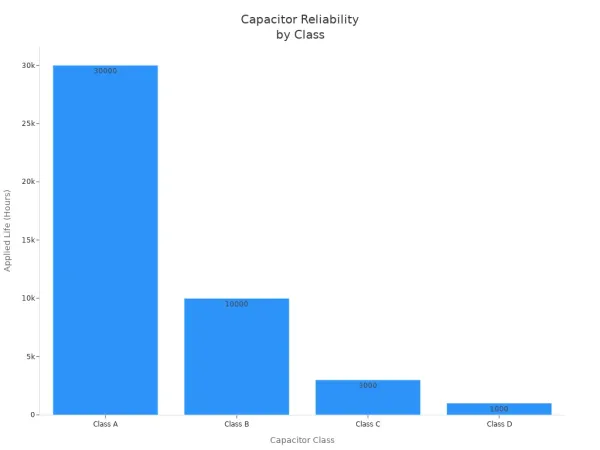
When you choose capacitors, always check the reliability class in the capacitor size chart. Higher classes last longer and work better in demanding applications.
🛠️ Remember: Using a capacitor size chart helps you learn how to choose the right size capacitor for any electronic component or integrated circuit. This step-by-step approach makes capacitor selection simple and effective.
Application Scenarios
Power Supply Filtering
You often use capacitors to filter power supplies in electronic circuits. The capacitor size chart helps you pick the right capacitor for your needs. When you want to smooth out voltage, you need to think about the size and type of capacitor.
- Larger capacitors work better for filtering low-frequency signals.
- Smaller capacitors remove high-frequency noise.
- The discharge speed of the capacitor affects how smooth the output voltage becomes. A slower discharge gives you better filtering.
- The type of capacitor and its extra features, like parasitic elements, also change how well it filters.
If you work on a power supply for an air conditioner, you must check the capacitor size for air conditioner units. For a 3 ton ac unit, a 4 ton ac unit, or a 5 ton ac unit, always use the capacitor size chart to match the right value and voltage rating. This step keeps your circuit safe and stable.
Tip: Use a mix of large and small capacitors for the best filtering in your power supply.
Space-Limited Designs
When you design wearable electronics or compact devices, space matters. You need to choose capacitors that fit into tiny spaces but still meet your system’s needs. The capacitor size chart shows you the smallest options.
- EIA 0201 size MLCCs measure only 0.6mm x 0.3mm.
- You can find capacitors with up to 10μF in this size.
- These capacitors help you build smaller devices, like smartwatches or fitness trackers.
- You use fewer components and save space on your circuit board.
If you design a 2 ton compressor or a compact integrated circuit, always check the capacitor size chart. This helps you pick the right capacitor size for ac motor circuits or any space-limited project.
Single-Phase Pumps
Single-phase pumps need the right capacitors for starting and running. The capacitor size chart gives you the details you need. Here is a table to help you choose:
| Capacitor Type | Key Characteristics | Typical Capacitance Values | Voltage Ratings |
|---|---|---|---|
| Starting Capacitors | High capacitance, short duty, electrolytic construction | 70-400 µF | 125V, 250V, 330V AC |
| Running Capacitors | Lower capacitance, continuous duty, film construction | 5-70 µF | Higher voltage ratings |
If you need a capacitor size for 1/2 hp motor, 1 hp motor, 1.5 hp motor, or 3 hp motor, always check the chart. The right capacitor size for 3 hp motor or any other motor keeps your pump running smoothly. You can use the same method for selecting capacitor size for ac motor circuits.
Note: Always match the voltage and capacitance to your pump’s requirements for safe and reliable operation.
Troubleshooting Selection Issues
Unclear Codes
You may find a capacitor with faded or missing markings. This can make it hard to know its value or voltage. When you face unclear codes, you have a few ways to solve the problem:
- Use a capacitance meter to measure the value directly. This tool gives you an accurate reading.
- Check the circuit schematic or bill of materials (BOM). These documents often list the exact specifications for the capacitors you need.
If you cannot find the information, ask for help from someone with experience in electronic components. Always double-check before you install a new capacitor.
Size Mismatches
Size mismatches happen more often than you might think. They can cause problems in your circuit or even damage your integrated circuits. Here are some common reasons for size mismatches:
- Incorrect installation, such as reversing polarity or using the wrong voltage, can cause malfunctions.
- Aging and degradation reduce the effectiveness of capacitors over time.
- High temperatures speed up the breakdown of electrolytic capacitors.
- Manufacturing defects sometimes lead to differences in size or performance.
You should always compare the physical size and ratings from the capacitor size chart before making a choice. This step helps you avoid mistakes and keeps your circuit safe.
Ensuring Safety
Safety is very important when you select capacitors for high-voltage circuits. You should look for capacitors with safety approvals like UL, VDE, or ENEC. Some types have special safety features:
- Class X capacitors connect across the power line. They are designed to fail as a short circuit, which activates upstream protection like fuses.
- Class Y capacitors connect between the hot line and earth ground. They are designed to fail as an open circuit, which prevents electric shock.
You can use this table to check the safety features:
| Class | Description | Safety Feature |
|---|---|---|
| Class X | Connected across the power line from hot to neutral | Designed to fail as a short circuit, preventing shock hazards |
| Class Y | Connected between hot line and earth ground | Designed to fail as an open circuit, preventing fatal electric shock |
Always choose the right capacitor for your application. This keeps your electronic components and integrated circuits safe and reliable.
You can select capacitors easily by following these steps:
- Examine each capacitor for markings.
- Identify the coding format.
- Interpret capacitance values.
- Check tolerance, voltage, and polarity.
- Use tools for unmarked capacitors.
A capacitor size chart helps you match purpose, value, voltage, and form factor for your project. Updated charts provide the latest specifications, so you make accurate choices for integrated circuits. You can find expert resources online to guide you in selecting capacitors confidently.
FAQ
How do you read a capacitor size chart?
You look for the size code and match it to the chart. The chart shows the length and width of each capacitor. This helps you pick the right part for your circuit or integrated circuit.
Why do capacitors have different case sizes?
Manufacturers design capacitors in different case sizes to fit various electronic components. Smaller sizes save space on your circuit board. Larger sizes can handle higher voltage or capacitance.
What happens if you use the wrong capacitor in a circuit?
If you use the wrong capacitor, your circuit may not work. The wrong size or voltage rating can cause overheating or failure. Always check the capacitor size chart before you install any capacitors.
Can you replace a capacitor with a different type?
You can replace a capacitor with another type if the voltage and capacitance match. Make sure the new capacitor fits your circuit and meets the requirements for your integrated circuit.
How do you check the reliability of capacitors?
You check the reliability class in the capacitor size chart. Higher classes last longer and work better in demanding electronic components. Always choose capacitors with the right reliability rating for your project.