How to Use HiSilicon Reference Designs Effectively
A team's success with a HiSilicon reference design begins with a methodical approach. This process precisely matches a produ
A team's success with a HiSilicon reference design begins with a methodical approach. This process precisely matches a product's primary vision requirements to the core specifications of HiSilicon AI SoCs. This clear vision prevents common pitfalls, such as creating AI products that cannot handle complex analytics for vision applications.
Following a structured path helps teams control costs. It accelerates their time-to-market for advanced computer vision applications. Pre-engineered designs offer a significant head start for a team's long-term vision.
Key Takeaways
- Choose the right HiSilicon design by matching your product's needs to the chip's features.
- Make a detailed list of what your product needs, like AI power and video quality, before you start.
- Change the design carefully to fit your product, like the camera lens or power parts.
- Keep track of all parts needed to build your product to control costs and avoid delays.
- Test your design thoroughly to make sure it works well and is ready for making many copies.
SELECTING THE RIGHT REFERENCE DESIGN
Choosing the correct reference design is the most critical decision in the development cycle. This choice directly impacts the product's final capabilities and cost. A team's product vision must align perfectly with the hardware's potential.
DEFINE CORE REQUIREMENTS
Teams should begin by creating a detailed requirements checklist. This document guides the entire selection process. It translates the product vision into concrete technical specifications. The checklist must cover three main areas: AI performance, video specifications, and physical interfaces. A thorough datasheet review is essential for this step.
Core Requirements Checklist Example A good checklist for a computer vision product includes:
- AI Performance: Define the necessary Tera Operations Per Second (TOPS) for your AI models. Simple object detection requires less power than complex behavior analysis. The datasheet for each potential DSP will specify its AI capabilities.
- Video Specifications: Specify the target resolution and frame rate. For example, 1080p at 30 FPS is optimal for many AI analytics applications, while 4K might be needed for forensic detail. The datasheet for the image signal processor (DSP) is key. This choice impacts bandwidth and storage needs.
- Intelligent Video Analytics: Evaluate the need for features like object tracking or rapid video review. This helps define the required DSP performance.
- Physical Interfaces: List all required ports, such as MIPI-CSI for the image sensor, Ethernet for connectivity, and USB for peripherals. The datasheet for the main SoC will list supported interfaces.
- Power and Environment: Note power consumption limits and if the device needs weatherproofing for outdoor surveillance applications. The datasheet for power management parts is crucial.
This detailed vision ensures all necessary components and parts are considered from the start. A clear vision prevents costly changes later. The DSP datasheet provides critical performance metrics.
MAP REQUIREMENTS TO HISILICON AI SOCS
After defining requirements, teams map them to specific HiSilicon AI SoCs. HiSilicon offers various series, each targeting different applications and performance levels. For instance, the Hi3559 series generally offers higher AI performance for demanding AI applications, while the Hi3516 series is optimized for mainstream surveillance. The datasheet for each DSP contains this information.
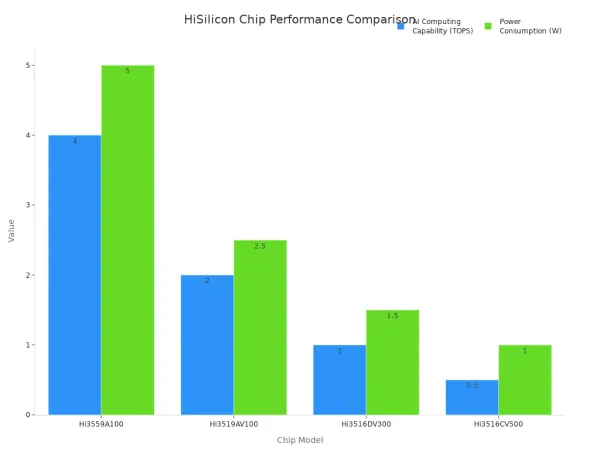
Comparing these series involves a trade-off between processing power, energy consumption, and cost. The datasheet for each chip provides the necessary data for this comparison. For example, a high-end AI product might need the 4 TOPS of a Hi3559A, whereas a simpler smart camera could use the 1 TOPS Hi3516DV300. Using datasheets helps clarify these differences.
| Feature | Hi3559A100 | Hi3519AV100 | Hi3516DV300 | Hi3516CV500 |
|---|---|---|---|---|
| AI Computing Capability | 4 TOPS | 2 TOPS | 1 TOPS | 0.5 TOPS |
| Power Consumption | 5W | 2.5W | 1.5W | 1W |
| Video Compression | 8K30fps H.265 | 4K30fps H.265 | 4MP@30fps H.265 | 2MP@30fps H.265 |
| Target Market | High-end | Mid-range | Surveillance | Smart HD IP Cam |
This data, found in the official datasheet, allows teams to select a System-on-Chip (SoC) that meets their performance goals without exceeding their budget or power envelope. The datasheet for the DSP is the source of truth for its capabilities.
Ultimately, the goal is to find reference designs built around the chosen SoC. The official datasheet for the selected parts and components will confirm compatibility. This methodical approach, starting from a clear product vision and using datasheets to validate every choice, ensures the selected DSP and overall design can deliver the intended user experience. This vision guides the selection of all parts.
CUSTOMIZING HARDWARE AND THE BOM
A reference design provides a validated foundation, not a final product. The next stage involves strategic hardware customization and careful Bill of Materials (BOM) management. This process adapts the generic design to meet the specific cost, performance, and feature goals of the product vision. Success here depends on methodical changes and intelligent component sourcing.
MODIFYING KEY HARDWARE
Teams modify key hardware to align the reference design with their product's unique requirements. These changes often target the image pipeline, power system, and connectivity. Each modification requires careful validation to ensure system stability and performance. The datasheet for each part is the primary guide for these changes.
The image sensor and lens are the most common parts to change. A team's vision for the product dictates this choice. Swapping the sensor requires checking the datasheet for the DSP to confirm compatibility with its MIPI-CSI interface and data format. The lens choice also has major implications.
- A low-quality lens mount can distort the camera body or allow lens elements to move.
- Zoom lenses can cause optical elements to shift, especially when the camera is rotated.
- These movements alter the relationship between the lens and the image sensor.
- Such changes disrupt camera calibration, which is essential for a clear vision and reliable AI analytics.
Power Management ICs (PMICs) often need adjustments. Adding or changing components like a more powerful Wi-Fi module alters the board's power budget. Engineers must consult the datasheet for the HiSilicon AI SoCs and other critical parts to understand their power rail requirements. A new PMIC ensures all components receive stable power. The datasheet for the PMIC provides its specifications.
Connectivity modules are another area for customization. A team might add a 5G modem or a specific Wi-Fi/Bluetooth combo module. This requires checking the datasheet for the DSP to ensure there is a suitable physical interface, like USB or SDIO. Driver availability and compatibility are also critical for the new parts to function correctly. The datasheet for the new module will detail its software needs.
BOM STRATEGY AND COMPONENT SOURCING
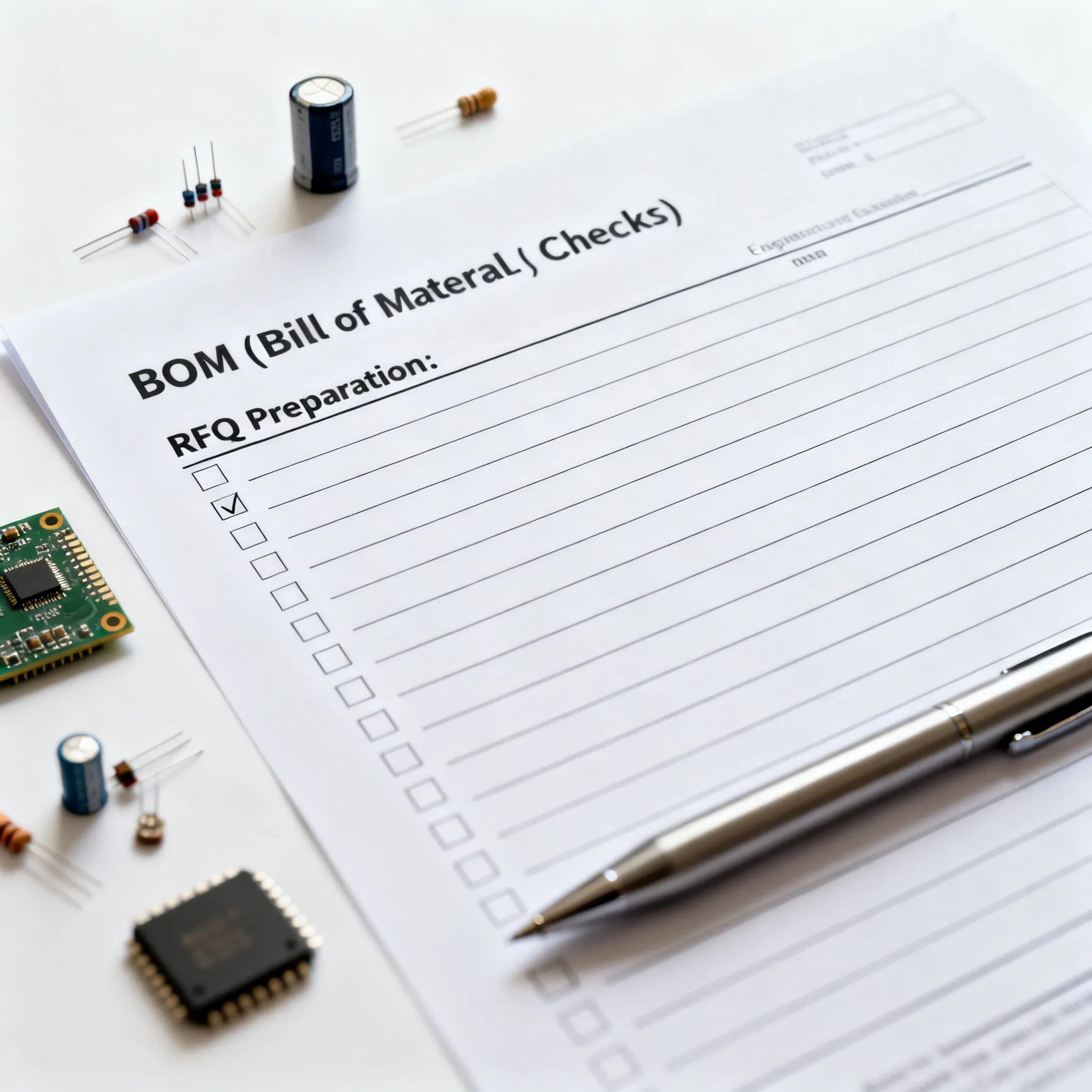
A well-managed BOM is essential for controlling costs and ensuring a stable supply chain. It is a living document that evolves with the design. An effective BOM strategy balances cost reduction with long-term component availability and system reliability. This is where careful component sourcing becomes critical.
A primary goal is cost reduction. Teams can often substitute generic passive components like resistors and capacitors with lower-cost alternatives. However, they must verify that the new parts meet the tolerance and performance specifications listed in the original datasheet. For critical parts like memory, sourcing cheaper options requires extreme caution. DDR memory and eMMC storage must strictly adhere to the timing and compatibility requirements specified in the datasheet for the DSP. Failure to ensure compatibility can lead to system crashes and data corruption.
Supply chain stability is paramount for mass production. Sourcing parts with long production lifecycles prevents disruptions. Engineers can build resilience directly into the design.
- Design for Flexibility: Standardizing parts, using modular architectures, and multi-sourcing components allow for easier swaps. For example, a design can accommodate multiple pin-compatible parts.
- Pin-Compatible Selection: Choosing pin-compatible parts during the schematic design phase makes component substitution simple if a part becomes unavailable.
- Cross-Product Sharing: Using the same components across different products helps manage inventory and improves sourcing leverage.
- Supplier Feedback: Real-time feedback from suppliers provides early warnings about potential shortages, allowing teams to react quickly.
This proactive approach to sourcing parts is vital. Engineers can collaborate with design teams to build flexibility into product designs. This means creating designs that accommodate multiple component options, such as specifying a range of acceptable capacitance values for a filtering circuit. This proactive approach, though requiring initial effort, significantly aids sourcing during shortages and helps prioritize components with stable supply chains.
"Our modular server racks survived three supplier bankruptcies last year because we could swap power modules in hours." — Data Center Hardware Director
Finally, teams must establish a robust process for component authentication. The risk of counterfeit parts is high, especially when sourcing from new or unverified suppliers. A counterfeit DSP or memory chip can cause unpredictable failures and damage a brand's reputation. Implementing a strict authentication process, including visual inspection and functional testing, is a non-negotiable step. This authentication ensures the integrity of all components and the final product's AI performance. This vision for quality control protects the entire project.
VALIDATING THE DESIGN FOR PRODUCTION
After customization, teams must rigorously validate the design. This final stage ensures the product is reliable, performs correctly, and is ready for mass production. Validation covers hardware integrity, thermal management, and AI model deployment. A clear vision for quality is essential here.
PERFORMING HARDWARE VALIDATION
Hardware validation begins with the initial board bring-up. This process confirms that the core parts, including the DSP, receive power and function correctly. The next step is a deep analysis of signal integrity (SI) and power integrity (PI). This is crucial for high-speed interfaces connecting to the DSP.
Teams use specialized tools for this analysis. For example, Synopsys PrimeSim can simulate signal behavior, while Altium's tools help design layouts that meet strict signaling standards. This prevents data errors between the DSP and other parts.
Engineers must also check for common hardware vulnerabilities. A thorough review can prevent failures like improper handling of instruction skips or susceptibility to power side-channel attacks. Identifying these issues early protects the final product's security and reliability for all AI applications. This vision for security is critical.
MANAGING THERMAL PERFORMANCE
Powerful HiSilicon AI SoCs generate significant heat during intensive processing. Effective thermal management is necessary to prevent performance throttling and ensure long-term reliability of all parts. The cooling strategy must match the DSP's power consumption and the demands of the vision applications.
Choosing the right Thermal Interface Material (TIM) is a key decision. TIMs help transfer heat from the DSP to a heat sink. Different materials offer various trade-offs.
| TIM Type | Advantages | Disadvantages |
|---|---|---|
| Greases | Excellent thermal conductivity; fills tiny gaps. | Can be messy and may "pump-out" over time. |
| Phase Change | Stable and easy to apply; no pump-out. | Lower thermal conductivity than greases. |
For low-power parts, a passive heat sink may be enough. However, a high-performance DSP running complex computer vision tasks often requires an active cooling solution, such as a fan, to maintain optimal performance. This vision for thermal stability protects the hardware.
DEPLOYING YOUR AI MODELS
The final validation step involves deploying the AI software. Teams adapt the reference Software Development Kit (SDK) and drivers for their custom hardware. A primary goal is to achieve maximum AI performance for the target vision applications.
A critical technique for this is creating a "zero-copy" pipeline. This allows the image data to flow directly from the board's ISP to the DSP's Neural Processing Unit (NPU). This efficient data path is vital for real-time AI vision tasks like face detection and face recognition. It eliminates memory bottlenecks that could slow down AI processing.
Finally, developers compile their neural networks for the specific DSP. They then deploy the compiled models to the NPU. Successful deployment confirms that the hardware and software work together seamlessly, delivering the intended AI vision performance. This final check validates the entire product vision.
Success with HiSilicon designs follows a clear path. Teams first select a design based on core requirements. They then strategically customize hardware for cost and function. Finally, they validate the entire system before production. A reference design is a powerful accelerator. Its true value emerges through intelligent adaptation and customization.
Final Tip: Treat the Bill of Materials (BOM) as a dynamic document from day one. This practice ensures all teams—from design to procurement—are aligned. It maintains control over costs and builds supply chain resilience.
FAQ
What is a HiSilicon reference design?
A HiSilicon reference design is a complete, pre-engineered circuit board. It includes a HiSilicon AI SoC, memory, and other essential parts. Teams use it as a starting point. This foundation helps them build their own custom smart camera products much faster.
What is the biggest risk when customizing hardware?
The biggest risk is creating system instability. Changing a key part like the image sensor or memory can cause issues. Engineers must carefully check the datasheet for the DSP. This ensures the new component is fully compatible with the HiSilicon SoC and works correctly.
Why is the Bill of Materials (BOM) so important?
The BOM lists every part needed to build the product. It directly controls the final cost and production schedule.
A well-managed BOM helps teams find lower-cost parts. It also protects the project from supply chain shortages, ensuring parts are available for mass production.
What does a 'zero-copy' pipeline do?
A zero-copy pipeline improves AI performance. It creates a direct path for video data between two key components on the board.
- It sends data from the Image Signal Processor (ISP).
- It delivers data straight to the Neural Processing Unit (NPU).
This process avoids slow memory copies.