Exploring the Versatility of 3 Pin Molex Plugs
You encounter the 3 pin molex plug in many electronic devices. This plug uses three contacts inside a rectangular nylon hous
You encounter the 3 pin molex plug in many electronic devices. This plug uses three contacts inside a rectangular nylon housing. The spring-metal pins lock securely, giving you stable power or signal connections. Molex connectors offer dependable performance even in environments with vibration or wear. You find the 3 pin molex plug in computers, consumer electronics, and industrial machines. Understanding molex features helps you choose the right plug for your projects, whether you work as a professional or enjoy electronics as a hobby.
Key Takeaways
- 3 pin Molex plugs provide reliable power and signal connections with three pins for live, neutral, and ground functions.
- Strong housings and locking features protect the plug from damage, vibration, and moisture, making them durable in tough environments.
- These plugs are widely used in computers, automotive, industrial machines, and LED lighting for easy and secure connections.
- Compared to 2 pin plugs, 3 pin versions offer speed feedback, and they differ from 4 pin plugs by lacking PWM control for precise speed adjustment.
- Choose the right Molex plug by matching voltage, current, size, and environment needs, and always buy from trusted sources to ensure quality and safety.
3 Pin Molex Plug Overview
Structure
When you look at a 3 pin molex plug, you see a simple but strong design. This 3-pin connector has several main parts that work together to keep your connections safe and reliable.
- Three Pins: Each pin has a job. One pin carries current to your device, another returns the current, and the third acts as a ground for safety.
- Housing: The outer shell is made from tough plastic. It protects the inside parts and gives you a good grip when you connect or disconnect the plug.
- Insulators: These keep each pin separate. They stop electricity from jumping between pins or touching the housing.
- Wiring: You find color-coded wires attached to each pin. For example, brown often means live, blue means neutral, and green/yellow means earth.
- Cable Grip: This part holds the cable tightly. It stops the wires from pulling out or breaking if you tug on the cable.
- Terminal Block: Inside the connector, this is where the wires meet the pins. It keeps everything secure and makes sure the 3-pin connector works well.
Tip: The strong housing and cable grip help the 3 pin molex plug last longer, even if you use it often.
Pin Functions
Each pin in a 3-pin connector has a special role. You need to know what each pin does to use the molex plug safely and correctly.
- The first pin usually brings power to your device. In many molex connectors, this is called the "live" pin.
- The second pin returns the current. This is the "neutral" pin.
- The third pin connects to the ground. This pin keeps you and your equipment safe by sending extra electricity away.
You often see the 3 pin molex plug in computer power supplies and other electronics. The female connector sits on the cable, while the male connector has pins inside a plastic shell. Each pin can carry a lot of current, so the 3-pin connector works well for many devices.
3 Pin Molex Plug Features
Housing and Locking
When you choose a 3-pin connector, you want a plug that stands up to tough conditions. The housing of molex connectors uses strong materials to protect the pins inside. You often see housings made from engineering plastics like polycarbonate, nylon, or polypropylene. These plastics resist heat, impact, and chemicals. Some molex plugs use metal housings, such as aluminum alloy or stainless steel, for extra strength and corrosion resistance. Metal housings work well in places with high humidity or salt.
You also find reinforced designs with thicker walls and shock-absorbing pads. These features help the plug resist vibration and impact. If you need a waterproof option, look for molex connectors with IP67 sealing. This keeps moisture and dust out, so your connection stays safe.
Locking mechanisms keep your molex plug secure. The contact design inside the molex receptacle holds the pins tightly. High-force pins improve retention, so the plug does not disconnect easily. You can use heat-shrink tubing, zip ties, or cable clips for extra security. These methods help prevent accidental unplugging, especially in busy or vibrating environments.
Tip: Always check for polarized designs. Polarized molex connectors only fit one way, so you avoid wiring mistakes.
- Common housing materials:
- Polycarbonate: Impact and heat resistant
- Nylon: Flexible and wear resistant
- Polypropylene: Chemical resistant and affordable
- Aluminum alloy: Lightweight and strong
- Stainless steel: High strength and corrosion resistant
Electrical Ratings
You need to know the electrical ratings before you use a 3-pin connector. Molex plugs handle different voltages and currents depending on the pin size and wire gauge. Most molex connectors work with standard voltages like 12V and 5V. The current rating per pin usually ranges from 5A to 8.5A. If you use thicker wires, you can reach up to 11A per pin under ideal conditions.
Here is a table showing typical ratings for molex plugs:
| Parameter | Value / Description |
|---|---|
| Standard Voltages | 12V (yellow wire), 5V (red wire) |
| Typical Current Rating | 5A to 8.5A per pin (depending on pin size and wire gauge) |
| Maximum Current (14 AWG) | Up to 11A per pin under ideal conditions (e.g., 30°C rise, 105°C max housing temperature) |
| Practical Current Limit | Usually limited to about 5A per pin in typical PSU applications |
| Connector Type Reference | 4-pin Molex connector data used as closest reference for 3-pin Molex plugs due to similar pin size |
| Factors Affecting Ratings | Wire gauge, temperature, wire length, ambient temperature, and application-specific conditions |
| Manufacturer Notes | End-user testing recommended; ratings are guidelines, not absolute standards |
Molex connectors meet safety standards like UL, CE, and IEC. Manufacturers use fire-resistant materials and test for electrical and mechanical safety. Many molex plugs use plastics with UL94V-0 flammability ratings. This means the material resists burning and helps keep your project safe. Some connectors meet UL 1977, CSA, and IEC 61984 standards for factory assembly and wiring boards.
Note: Always check the ratings and certifications before you use a molex plug in your project.
Durability
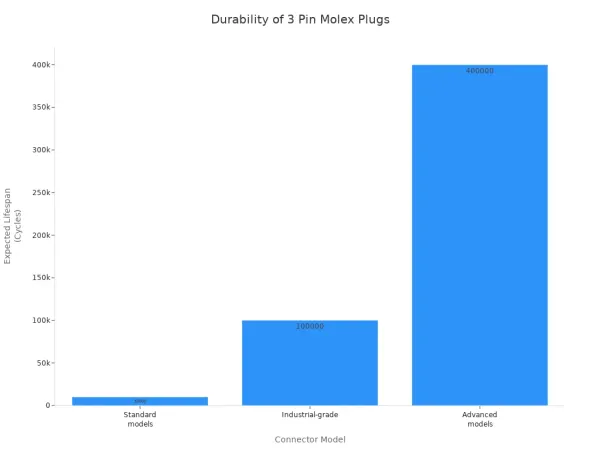
You want your 3-pin connector to last through many cycles of use. Molex plugs go through tough tests to prove their durability. Engineers test for mechanical wear by inserting and removing the plug thousands of times. Standard molex connectors last for at least 10,000 cycles. Industrial-grade models can reach 50,000 or even 100,000 cycles. Advanced designs may last up to 400,000 cycles.
Design features like chamfering and conical plunger tips reduce wear and extend the life of the pins. Laser polishing lowers friction, so the contact stays stable after many cycles. Environmental tests include temperature shocks from -40°C to 125°C and salt spray for corrosion resistance. IP67 sealing keeps moisture and dust out, so your molex plug works well outdoors or in factories.
Materials matter for durability. You find beryllium copper with gold plating for plungers, stainless steel for springs, and brass barrels with nickel or gold plating. These materials resist corrosion and keep contact resistance low.
Here is a chart showing the lifespan of different molex connectors:
Tip: Choose a molex plug with IP67 sealing and reinforced housing if you need long-term reliability in harsh environments.
- Durability highlights:
- Chamfering and conical tips extend pin life
- Laser polishing keeps contact stable
- IP67 sealing protects against moisture and dust
- Tested for temperature shock and corrosion resistance
- Lifespan ranges from 10,000 to 400,000 cycles
Molex Applications

Computer Hardware
You often see molex plugs in computer hardware. These connectors played a big role in older computers. You used them to power floppy disk drives, hard drives, and optical drives. Many older case fans also used molex plugs before the rise of dedicated fan connectors. Today, most modern fans connect directly to motherboard fan connectors for better speed control. However, molex plugs still help you power cooling fans in custom setups or older systems.
Molex plugs provide both +12V and +5V power lines. This makes them useful for many devices inside a computer case. You can use adapter cables to convert molex to SATA or PCIe power connectors. This helps you connect new drives or graphics cards to older power supplies. You also find molex plugs in server cooling fans and some older graphics cards.
Molex plugs support both wire-to-board and wire-to-wire connections. This means you can connect wires directly to a circuit board or link two cables together. The table below shows some features that make molex plugs reliable in computer hardware:
| Feature | Description |
|---|---|
| Connector Series | Micro-Fit 3.0, Mini-Fit Jr., SPOX, Mini-Lock |
| Pitch Size | 2.5 mm to 3.0 mm |
| Wire Gauge (AWG) | #16 to #30 |
| Current Rating | 3.0 A to 13.0 A |
| Connection Types | Wire-to-wire, wire-to-board, board-to-board |
| Terminal Type | Crimp terminals for secure mating |
| Housing Features | Insulation protection, retainer compatibility, self-aligning |
| Connector Orientation | Straight and right-angled types |
| Mechanical Reliability | Modular design for easy and reliable connections |
Tip: If you work with older computers or custom builds, keep some molex plugs and adapter cables handy for flexible power solutions.
Automotive and Industrial
You find molex plugs in many automotive and industrial applications. In cars, these connectors power dashboard controls, sensors, and lighting systems. You also see them in engine control units and wiring harnesses. Molex plugs handle vibration and temperature changes well, so they work in tough environments.
In factories, molex plugs connect sensors, control panels, and motors. You use them for wire-to-board and wire-to-wire connections. This makes repairs and upgrades easier. The strong housing and locking features keep the connection secure, even with heavy use.
Many industrial machines use molex plugs for quick assembly and maintenance. You can unplug a sensor or replace a control panel without rewiring the whole system. This saves time and reduces downtime.
- Common automotive and industrial uses:
- Powering dashboard lights and controls
- Connecting sensors and actuators
- Linking control panels to main systems
- Wiring harnesses in vehicles and machinery
Note: Molex plugs with waterproof or IP67-rated housings work well in outdoor or harsh environments.
LED and Electronics
Molex plugs play a big part in LED lighting and other electronics. You use them to connect power, ground, and signal lines in LED strips and fixtures. These plugs make assembly and maintenance easy. You can quickly swap out a faulty LED strip or add new lights to your setup.
Waterproof molex plugs with IP67 or IP68 ratings protect your connections from water and dust. This is important for outdoor LED lighting or electronics in harsh environments. You find these plugs in garden lights, streetlights, and even underwater lighting.
In consumer electronics, molex plugs connect small devices like sensors, switches, and control boards. You see them in home appliances, toys, and audio equipment. The secure locking mechanism keeps the connection stable, even if you move the device.
- Popular LED and electronics applications:
- Connecting LED strips and modules
- Powering outdoor and waterproof lighting
- Linking sensors and control boards in gadgets
- Providing quick connections in home appliances
Callout: Choose the right molex plug for your LED project. Look for waterproof options if you plan to use them outdoors.
Comparison
2 Pin vs 3 Pin
You may wonder when to choose a 2 pin molex plug instead of a 3 pin version. The 2 pin molex plug gives you only positive and negative poles. You use it for simple power delivery without speed feedback. This design works best for devices that run at a constant speed and do not need monitoring. Here are some common scenarios:
- You power a basic fan that does not require speed control.
- You connect devices that need only on/off operation.
- You set up circuits where speed feedback is not important.
A 3 pin molex plug adds a speed feedback line. This extra pin lets you monitor or control the speed of your device, such as a fan. You use a 3 pin plug when you want real-time speed data or need to adjust performance.
3 Pin vs 4 Pin
You see another difference when you compare 3 pin and 4 pin molex plugs. The 3 pin version gives you ground, power, and a tachometer signal for speed feedback. The 4 pin molex plug adds a PWM control signal. This extra pin allows precise speed control without causing the fan to stall at low speeds.
| Pin Number | Function |
|---|---|
| 1 | Ground |
| 2 | Tachometer (speed signal) |
| 3 | +12 V power |
| 4 | PWM control signal |
With a 3 pin plug, you control speed by changing the voltage. This method can cause stalling if you lower the speed too much. The 4 pin plug keeps the voltage steady and uses PWM for smooth speed changes. You can plug a 3 pin molex into a 4 pin header, but you lose PWM control. You can also use a 4 pin fan with a 3 pin header, but it runs at full speed.
Advantages
You gain several benefits when you use a 3 pin molex plug. The design fits many wire sizes and setups, making it flexible for different tasks. You find installation easy because the structure is simple. Both beginners and experts can use molex plugs without trouble. These connectors work well for light-duty or indoor jobs where you do not need extra weather protection. You also see molex plugs in many car wiring systems and modern standards, which adds to their convenience.
Tip: Choose a 3 pin molex plug for projects that need speed feedback and easy installation. You get reliable performance and broad compatibility.
Selection Tips
Choosing the Right Plug
Selecting the right 3 pin Molex plug helps you avoid problems and ensures your project works well. You need to match the connector to your application and environment. Start by looking at the main factors in the table below:
| Factor | Description |
|---|---|
| Application Environment | Think about temperature, moisture, shock, and vibration. Tough jobs need high-performance connectors. |
| Reliability | Check how many times you will connect and disconnect. Choose durable materials for frequent use. |
| Precision | Use precision-machined pins for a good fit in tight or complex spaces. |
| Quality | Pick connectors with brass or beryllium copper and gold plating for better contact and longer life. |
| Vendor Versatility | Look for vendors with many sizes, mounting options, and packaging choices. |
You should also follow these steps when picking a plug:
- Check voltage and current ratings. Make sure the connector can handle your device’s power needs.
- Confirm the size and shape fit your device or circuit board.
- Think about the environment. High temperatures need plugs rated for heat, sometimes up to 1200ºF.
- Choose connectors made from strong materials that resist corrosion and wear.
- Look for industry certifications for safety and performance.
- Balance your budget with the quality and features you need.
- Research the vendor’s reputation and read reviews.
⚡ Tip: Always match the connector’s temperature rating to your application. High heat can damage standard plugs, so choose thermosetting plastic bodies for hot environments.
Sourcing
When you buy 3 pin Molex plugs, you want to avoid common mistakes. Many people have trouble finding the exact connector type, such as the Molex KK 254 or its equivalents. Some versions, like cable-mount male plugs, are hard to find. You may also see low-quality or fake connectors on some online platforms.
Here are some pitfalls to watch for:
- Misaligned pins can bend and cause bad connections.
- Moisture or dirt can build up on contacts and reduce performance.
- Damaged overmolding from bending or shock can lead to failures.
- Exceeding the connector’s mating cycles can cause wear and poor contact.
You should buy from trusted distributors like DigiKey or Mouser. These sources offer genuine parts and clear specifications. Always check the product details and reviews before you order. This helps you avoid compatibility issues and ensures your project runs smoothly.
🛠️ Note: Authentic connectors last longer and work better. Avoid cheap imitations to keep your devices safe and reliable.
You choose a 3 pin molex plug for its reliability, easy installation, and wide compatibility with common PCBs. Its modular design lets you modify or repair connections quickly. The plug’s strong materials and locking features keep your devices safe in tough environments.
Remember: Always match the connector’s ratings to your project and buy from trusted sources. Consider your device’s needs and space before making a final choice.
- Standard pitch fits many boards
- Pre-made assemblies help beginners
- Safety features protect your devices
FAQ
What devices use 3 pin Molex plugs?
You find 3 pin Molex plugs in computers, LED lights, car dashboards, and industrial machines. These connectors help you power fans, sensors, and control panels. You see them in many electronics projects.
How do you connect a 3 pin Molex plug safely?
You match the plug to the socket. Make sure the pins line up. Push the plug in until it clicks. Check for a secure fit. Never force the connector. If it feels loose, inspect for damage.
Can you use a 3 pin Molex plug outdoors?
You can use waterproof or IP67-rated Molex plugs outdoors. These plugs keep water and dust out. Always check the rating before you install the connector outside.
What is the difference between male and female Molex plugs?
You see pins inside the male plug. The female plug has sockets that receive the pins. You connect the male plug to the female plug to complete the circuit.