Understanding 2 Pin Molex Plugs and Their Uses
A 2 pin molex plug uses a simple pin-and-socket design that helps you connect two wires safely and quickly. This 2 pin conne
A 2 pin molex plug uses a simple pin-and-socket design that helps you connect two wires safely and quickly. This 2 pin connector lets you manage power in many electronic devices. You often find a 2 pin connector in computers, LED lights, and small machines. The molex brand makes this type of connector strong and reliable. You can trust a 2 pin connector for steady connections. Many people choose a 2 pin connector because it is easy to use. The plug works well for jobs that need a quick and safe link.
Key Takeaways
- A 2 pin Molex plug offers a simple, strong connection using a pin-and-socket design with secure locking to prevent accidental unplugging.
- The plug uses durable materials like brass or copper pins with protective plating and heat-resistant plastic housing, making it reliable in tough environments.
- You can find 2 pin Molex connectors in many devices, including computers, cars, industrial machines, and DIY projects, thanks to their versatility and ease of use.
- The connector supports a wide range of wire sizes and current ratings, but always check compatibility and safety standards before use to avoid problems.
- Compared to other connectors, 2 pin Molex plugs provide better durability, higher current capacity, and secure locking, making them ideal for medium-power and harsh conditions.
What Is a 2 Pin Molex Plug?
Structure
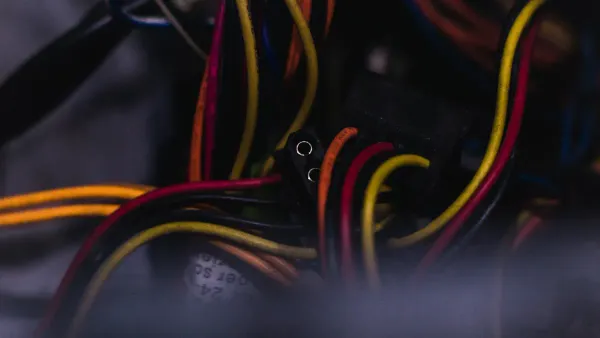
When you look at a 2 pin connector, you see a simple but smart design. The connector has two main parts: the plug and the receptacle. The plug holds the pins, while the receptacle contains the sockets. Each pin fits into a socket, which creates a strong electrical path. You often find insulation walls inside the connector housing. These walls protect the terminals and keep them from touching each other. The housing also has friction locks and guide walls. These features help you line up the plug and receptacle easily and keep them connected.
You can use this 2 pin connector with different wire sizes, usually from AWG #16 to #24. The pitch, or distance between the pins, is often 3.0 mm. This size works well for many electronics, such as 3D printers and industrial robots. The connector uses crimp terminals. You attach these terminals to the wires by pressing them on with a special tool. The housing protects the crimped wires and keeps the connection stable. You can also find both male and female crimping pins, which lets you make custom cable lengths and extensions.
Tip: The locking mechanism inside the connector uses grooves and latches. This design keeps the plug and receptacle tightly joined, even if you pull or twist the cable.
How the Plug Works
The 2 pin connector uses a pin-and-socket system to move electricity from one device to another. When you push the plug into the receptacle, each pin slides into a matching socket. This action creates a secure electrical contact. The design supports many wire sizes, from 14 AWG to 30 AWG, so you can use it in different projects. The connector can handle up to 9A of current and 600V of voltage, which makes it safe for most medium-power uses.
You do not have to worry about the connector coming loose by accident. The locking mechanism only releases when you press it with your fingers. Pulling on the cable or dropping the connector will not break the connection. This feature helps you use the 2 pin connector in places with lots of movement or vibration, like inside cars or machines.
Here is a quick look at what makes this connector work so well:
- Pin-and-socket design gives you a reliable electrical path.
- Locking grooves and latches prevent accidental unplugging.
- Crimp terminals fit many wire sizes for flexible use.
- The housing protects the contacts and keeps the connection stable.
You can trust the 2 pin molex plug for steady power in many devices. The connector’s simple structure and strong locking system make it a top choice for safe and easy wiring.
Molex Two Pin Connector Design
Materials
When you choose a 2 pin connector, you want to know what makes it safe and reliable. The materials inside a molex two pin connector play a big role in how well it works. You find that the pins use brass or copper. These metals help electricity move easily. Sometimes, manufacturers add nickel or gold plating to the pins. This extra layer stops rust and keeps the connection strong. Tinned copper or nickel-plated copper pins also keep the 2 pin connector working well over time.
The housing, which holds the plug and receptacle together, uses special plastics. PA66 nylon is common because it resists heat and chemicals. You also see polycarbonate (PC) and polybutylene terephthalate (PBT) in some molex connectors. These plastics protect the connector from acids, oils, and detergents. Some housings blend PC and PBT to make the connector even tougher. Waterproof ratings like IP65 and IP67, along with rubber seals, keep moisture and dust out. This helps you use the 2 pin connector in places where water or dirt might cause problems.
Note: Secure locking mechanisms and good insulation materials inside the receptacle prevent accidents and keep your connection safe.
- Pins made from brass or copper with nickel or gold plating
- Flame-retardant and heat-resistant plastics for housing
- Waterproof seals and ratings for extra safety
- Chemical-resistant materials like PC and PBT
Durability
You want your 2 pin connector to last a long time, even in tough conditions. Molex connectors use premium materials that stand up to heat, vibration, and harsh chemicals. The housing protects the plug and receptacle from damage. You can use these connectors in cars, factories, and outdoor machines. The chemical-resistant plastics support a wide temperature range. This means your connector works in both hot and cold places.
The locking system keeps the plug and receptacle joined, even if you shake or move the wires. Rubber seals and strong plastics stop water and dust from getting inside. You do not have to worry about the connector failing in wet or dirty environments. Molex connectors often meet IP64, IP65, or IP67 ratings. These ratings show that the connector can handle moisture and dust. You get a reliable connection that stays safe over time.
Molex connectors give you peace of mind because they resist corrosion and wear. You can trust the 2 pin connector for steady power in many jobs.
2 Pin Molex Plug Applications
Consumer Electronics
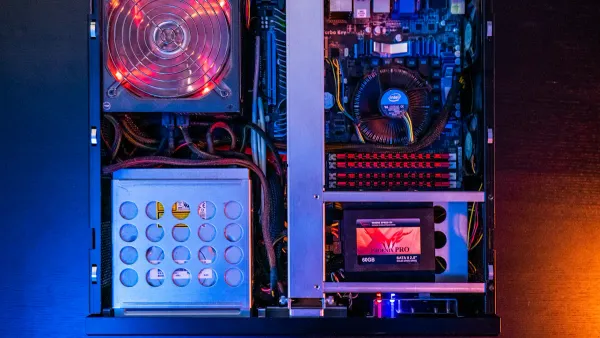
You see the 2 pin connector in many consumer electronics. This connector helps you power devices safely and easily. You find it inside desktop computers, where it connects fans, hard drives, and CD/DVD drives. The 2 pin molex plug gives a simple way to deliver power to small parts. You also see it in LED lighting systems. The connector supports low-voltage DC power, which keeps your lights bright and steady.
Here are some common devices that use the 2 pin connector:
- 3.5-inch floppy disk drives
- Older hard drives (PATA and non-SCA SCSI)
- Motherboards and video cards
- Small fans and sensors
- CD/DVD drives
- LED strips and modules
The connector works well for devices that need power but not data transfer. You get reliable power delivery because the connector meets important technical standards. These standards include pin pitch, current and voltage ratings, and insulation resistance. The connector also passes tests for durability, such as thermal cycling and vibration. You can trust the 2 pin connector to keep your electronics running smoothly.
Tip: If you build or repair computers, you will use the 2 pin molex plug for quick and secure power connections. The plug fits many small peripherals and helps you avoid loose wires.
Automotive & Industrial
You find the 2 pin connector in cars, trucks, and industrial machines. The connector supports dashboard electronics, sensors, and lighting systems. It works well in high-vibration environments, such as inside engines or heavy equipment. The molex design keeps the connection stable, even when the machine shakes or moves.
In industrial settings, you see the connector in manufacturing robots, agricultural machinery, and control panels. The connector uses strong plastics and gold-plated pins to resist corrosion and heat. Medical equipment also uses the 2 pin connector. Devices like heart rate monitors and blood pressure monitors need stable power and signal transmission. The connector uses waterproof seals and special materials to protect against moisture and dust.
Here is a table showing how the connector adapts to tough environments:
| Feature | Benefit |
|---|---|
| Compact design | Saves space in tight equipment |
| Durability and reliability | Lasts for over 10,000 cycles |
| Waterproof and dustproof | IP67 rating protects against moisture and dust |
| Vibration resistance | Maintains stable connection in moving machines |
| High current and voltage | Supports up to 50A and 250V |
| Easy installation | Reduces downtime and maintenance costs |
| Customization options | Fits different wire sizes and device needs |
| Application examples | Used in medical devices and industrial machinery |
You get a connector that stands up to harsh conditions. The 2 pin connector keeps your machines and medical devices working safely.
Note: The molex connector resists electromagnetic and radio frequency interference. This feature helps you use it in sensitive medical and industrial equipment.
DIY & Hobby
You use the 2 pin connector in many DIY and hobby projects. The connector makes wiring easy for beginners and experts. You often see it in battery packs, especially for 1s LiPo batteries. The connector lets you connect and disconnect wires quickly. You do not need special tools for most projects.
Popular DIY uses include:
- Robotics projects
- Small electronics builds
- Quick connect/disconnect for battery packs
- LED strip installations
- Custom PC mods
You find features like pre-soldered wires, heat-shrink tubing, and polarity markings. These features help you avoid mistakes and make your project safer. The connector supports compact wire-to-wire connections, which saves space in your builds. You get reliable power delivery and easy assembly.
Tip: If you enjoy building robots or custom electronics, the 2 pin molex plug gives you a simple and safe way to connect wires. The connector applications in DIY projects make your work faster and more reliable.
Pros & Cons of 2 Pin Connector
Benefits
You get many advantages when you use a 2 pin connector in your projects. The design makes assembly easy, so you can connect wires without much effort. You do not need special tools for most jobs. The 2 pin connector saves you time and reduces mistakes. You also find that the molex brand offers strong materials, which help the connector last longer.
- The 2 pin connector supports a high current rating. Standard models can handle between 8.5A and 11A per pin, depending on wire size and type. Most users limit the current to about 5A per pin for safety.
- You can use the 2 pin connector in many devices, from computers to cars. The plug works well in both consumer and industrial settings.
- Cost-effectiveness is another benefit. You pay less for a 2 pin connector compared to more complex connectors. This helps you keep project costs low.
- The molex design resists heat, vibration, and chemicals. You get a reliable connection even in tough environments.
Tip: Always check the current rating and wire size before you use a 2 pin connector. This helps you avoid overheating and keeps your devices safe.
Limitations
You should know the limits of the 2 pin connector before you choose it for your project. Safety and compatibility are important factors. The connector must meet standards like UL and IEC to ensure safe operation. These standards cover voltage, current, and environmental resistance.
- Not all 2 pin connectors fit together. Molex connectors may look similar to other brands, but differences in pin shape, housing, and locking mechanisms can cause problems. You need to match pins, headers, and housings from the same product line.
- Using connectors with ratings below your needs can lead to overheating or failure. Always check the plug’s ratings for your application.
- Regulatory compliance is key. Look for certifications like UL and IP ratings. These show the connector meets safety and environmental standards.
- Compatibility issues often happen in mixed-connector environments. Pins may not seat properly, and housings may not fit snugly. This can cause unreliable connections.
Note: You should always verify the connector’s ratings and certifications before you install it. This reduces failure rates and keeps your devices running smoothly.
Molex Plug vs Other Connectors
JST
You often see JST connectors in small electronics. These connectors work well for compact designs, like drones or handheld devices. JST connectors have smaller pitches, such as 1.0mm for the SH series, which saves space. You need precise tools to assemble JST connectors, and the process can be tricky. Molex connectors, including the 2 pin connector, have larger pitches and more forgiving tolerances. You find them easier to assemble and less likely to cause errors. Molex connectors also offer better locking mechanisms and higher temperature resistance, which makes them suitable for tough environments.
Here is a table that shows the differences in current and voltage ratings:
| Connector Type | Max Current | Max Voltage |
|---|---|---|
| Molex PicoBlade | Up to 1A | Up to 150V |
| JST SH | Up to 1A | Up to 50V |
| JST PH | Up to 2A | Up to 100V |
| Molex KK | Up to 5A | Up to 250V |
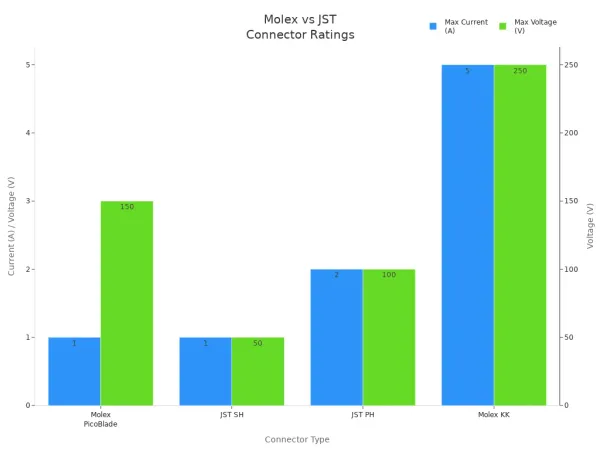
You get more options for rugged use with a molex 2 pin connector. JST connectors fit best in small, low-power applications.
Barrel Connector
Barrel connectors appear in many consumer electronics, such as wall adapters and small appliances. You recognize them by their round shape and simple tip-and-sleeve contacts. Barrel connectors have a larger contact surface, which helps with heat dissipation and lowers contact resistance. You find them easy to use, but they may loosen over time. Molex 2 pin connector supports higher current, up to 11A per pin, and works well for internal computer peripherals and high-power devices.
Here is a table comparing barrel connectors and molex connectors:
| Feature | Barrel Connectors | Molex Connectors (Series 8981) |
|---|---|---|
| Typical Application | Low-cost consumer electronics, wall power adapters | Internal computer peripherals, CNC machines, 3D printers |
| Number of Contacts | Two (tip and sleeve) | Multiple pins |
| Current Rating | Low to moderate | Up to 11A per pin |
| Physical Characteristics | Round, varying sizes | Rectangular, designed for high current |
| Usage Notes | Easy to use, may loosen | Tight fit, reliable for high-power applications |
You choose a 2 pin connector when you need a secure, high-current connection. Barrel connectors work best for simple, low-power tasks.
Choosing the Right Plug
You need to match the connector to your environment and application. If you work in harsh conditions, such as high vibration or moisture, a molex 2 pin connector with an IP67 rating gives you better protection. You should check the current rating and wire size before you decide. Crimp terminals and gold plating improve performance and durability. You also want strain relief to prevent wire damage. Compact size and flexible pin count help in tight spaces.
Tip: Always consider the operating environment, current needs, and assembly process when you select a connector for your applications.
You get reliable power delivery and long-lasting connections when you choose the right 2 pin connector for your job.
You see the 2 pin Molex plug in many devices because it offers simple, reliable connections. You can use it for power and signal in electronics, cars, and industrial machines.
- Compatibility: Fits most power outlets and devices worldwide.
- Portability: Small and light for travel and portable electronics.
- Versatility: Works in audio, medical, and automotive systems.
- Cost-effectiveness: Cheaper than grounded connectors.
Choose a 2 pin Molex plug when you need a secure, easy-to-assemble connector for low-power projects or tough environments.
FAQ
What wire sizes work with a 2 pin Molex plug?
You can use wire sizes from 16 AWG to 24 AWG with most 2 pin Molex plugs. Always check the connector’s datasheet for the exact range. Using the right wire size helps you get a safe and strong connection.
Can you use a 2 pin Molex plug for both power and signal?
Yes, you can use a 2 pin Molex plug for power or signal. Most people use it for low-voltage power. You can also use it for simple signals, like turning on a light or sending a sensor reading.
How do you remove a 2 pin Molex plug safely?
Always press the locking tab before pulling the plug out.
Pulling without pressing the tab can damage the connector or wires. Use gentle force and avoid twisting the plug.
Are 2 pin Molex plugs waterproof?
Some 2 pin Molex plugs have waterproof ratings like IP65 or IP67. These models use rubber seals to keep water and dust out. Always check the product details if you need a waterproof connector.