Never Underestimate Your RJ45 and Ethernet Port Again
The RJ45 connector is the physical plug on ethernet cables. It acts as a critical gateway for all the data on your network.
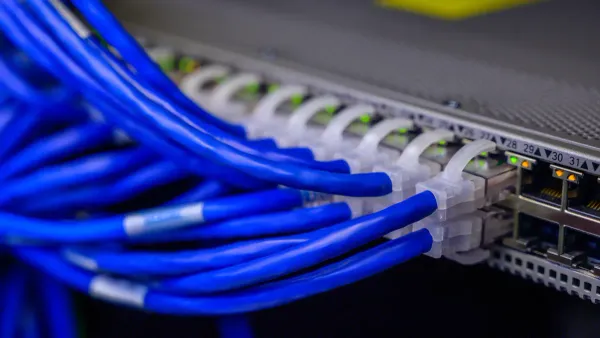
The RJ45 connector is the physical plug on ethernet cables. It acts as a critical gateway for all the data on your network. The RJ45 and ethernet system works like a key and lock. The RJ45 connector is the key, and the port is the lock. Together, these connectors unlock high-speed data transmission. This small connector completes an electrical circuit, allowing data to flow between devices. The quality of this connector, cable, and wiring is fundamental for stable connections. These RJ45 ethernet connectors form the backbone of reliable network connections for both the internet and a local area network, ensuring your high-speed connections perform as expected on all networks.
Key Takeaways
- The RJ45 connector is a small plug on Ethernet cables. It is very important for fast and reliable internet connections.
- The quality of your RJ45 connector affects network speed. A bad connector can make your internet slow or stop working.
- RJ45 connectors have different types, like Cat5e or Cat6a. Match the connector type to your cable for the best speed.
- You can check for problems with your RJ45 connector. Look for bent pins or a loose fit. Try a different cable if your internet is not working.
Understanding the RJ45 Connector
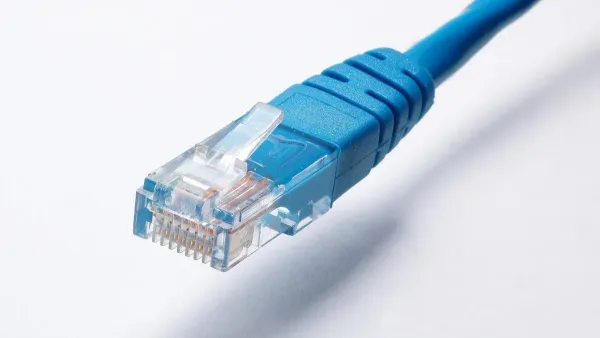
A deeper look into the RJ45 and ethernet system reveals a precisely engineered component. Understanding the RJ45 connector is key to appreciating its role in your network. The connector's design and wiring directly impact the performance of your connections.
The 8-Pin 8-Position Structure
The common RJ45 connector uses an 8-Pin, 8-Position (8P8C) modular design. This means it has eight positions for contacts, all of which contain a pin to make an electrical connection. The physical specifications for these connectors are defined by the ANSI/TIA-1096-A standard. Each of the eight pins in the RJ45 connector has a specific job. For Gigabit Ethernet, all eight pins work together to send and receive data, maximizing bandwidth. This complex interaction allows the connector to support high-speed networks. The following rj45 pinout diagram shows the function of each pin.
| Pin | Signal Name | Description |
|---|---|---|
| 1 | BI_DA+ | Bi-directional Data Pair A + |
| 2 | BI_DA- | Bi-directional Data Pair A - |
| 3 | BI_DB+ | Bi-directional Data Pair B + |
| 4 | BI_DC+ | Bi-directional Data Pair C + |
| 5 | BI_DC- | Bi-directional Data Pair C - |
| 6 | BI_DB- | Bi-directional Data Pair B - |
| 7 | BI_DD+ | Bi-directional Data Pair D + |
| 8 | BI_DD- | Bi-directional Data Pair D - |
The Role of the Ethernet Port
The Ethernet port is the female jack on your device where you plug in the RJ45 connector. This port acts as the gateway to the device's internal network infrastructure. When an RJ45 plug is inserted, its pins make contact with the port's connectors, completing a circuit. This allows electrical signals to travel from the Ethernet cable to the integrated circuits that process the network data.
💡 Pro Tip: The small LED lights on an Ethernet port provide valuable diagnostic information. A solid green light usually indicates a successful link, while a flashing light signals data activity. The color can also indicate speed, such as yellow for 1,000 Mbit/s and green for 100 Mbit/s.
Wiring Standards: T568A vs. T568B
The eight wires inside Ethernet cables must be arranged in a specific order. Two standards govern this wiring: T568A and T568B. The only difference between them is the position of the orange and green wire pairs. While both standards work equally well, T568B is far more common in modern networks. However, some applications of rj45 connectors require the T568A standard. For example, U.S. government contracts often mandate T568A wiring for uniformity. It also offers backward compatibility with older telephone systems. The key is consistency; both ends of a cable must use the same wiring standard for the network connection to function correctly. This is why understanding the rj45 connector and its wiring is crucial. These RJ45 ethernet connectors are fundamental to building reliable networks.
RJ45 and Ethernet Performance
The quality of an RJ45 connector directly impacts network speed and reliability. From an electronics standpoint, the connector and port are not just plastic housings; they are the final bridge in a complex electrical circuit. A poorly made or damaged connector can disrupt this circuit, leading to significant performance degradation. Issues like a bad crimp introduce problems such as packet loss and intermittent connections, turning a high-speed link into an unreliable one.
Connector Category and Speed
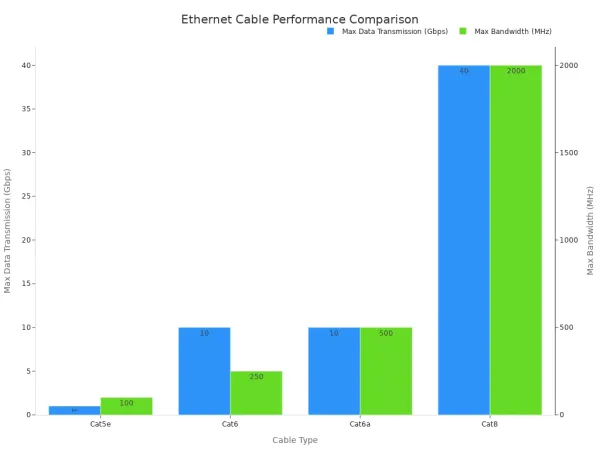
RJ45 connectors are manufactured in different categories, just like Ethernet cables. Each category is designed to meet specific performance standards for data transmission and bandwidth. Using a lower-category connector with a higher-category cable creates a bottleneck. This mismatch prevents the network from reaching its full potential. For example, a Cat5e connector on a Cat6a cable will limit the connection to Cat5e speeds. The integrated circuits in your devices can only process the data that the weakest link in the physical connection allows.
| Cable Type | Max Data Transmission | Max Bandwidth (MHz) |
|---|---|---|
| Cat5e | 1 Gbps | 100 MHz |
| Cat6 | 10 Gbps (up to 55m) | 250 MHz |
| Cat6a | 10 Gbps | 500 MHz |
| Cat8 | 40 Gbps | 2,000 MHz |
As the category number increases, so does the performance. Cat6a supports 10 Gbps over the full 100-meter distance, while Cat8 offers incredible 40 Gbps speeds over shorter runs, ideal for data centers. Choosing the right category for your RJ45 ethernet connectors ensures your physical wiring can support the speeds your networks demand.
Shielded vs. Unshielded Connectors
RJ45 connectors come in two main types: unshielded (UTP) and shielded (STP). Unshielded connectors are common and suitable for most home and office environments with low electrical noise. Shielded RJ45 connectors feature a metal housing that protects the data signals from electromagnetic interference (EMI).
When to Use a Shielded RJ45 Connector:
- In industrial settings with heavy machinery or motors.
- Near high-power electrical equipment or RF transmitters.
- For high-bandwidth applications in dense data centers to reduce crosstalk.
- In critical environments like hospitals or broadcast facilities where signal integrity is paramount.
The metal shell on a shielded RJ45 acts like a Faraday cage. It captures interference and safely directs it to the ground. For this to work, the entire channel—including the cable, connectors, and patch panels—must be shielded and properly grounded. This creates a continuous electrical shield, preserving the integrity of the signals traveling through the wiring to the device's circuits. This complete system is essential for reliable network connections in noisy environments.
The Cost of a Poor Connection
A faulty RJ45 connector is a common source of network problems. Studies show that physical layer issues, including bad cables and connectors, account for up to 80% of all network downtime. A poorly crimped RJ45 connector creates an impedance mismatch in the electrical circuit. This mismatch causes signal reflection, where part of the data signal bounces back to the source instead of reaching its destination.
This unreliable mechanical stability also increases crosstalk, which is interference between the wire pairs inside the Ethernet cable. The result is data corruption, packet loss, and slower speeds. Even if a simple wire map test shows the connections are in the right order, these subtle electrical issues can severely degrade performance. Ultimately, a cheap or poorly installed connector can undermine an entire high-speed network infrastructure, making it a costly point of failure for many applications. The rj45 and ethernet system relies on quality components for every part of the connection.
Practical RJ45 Troubleshooting
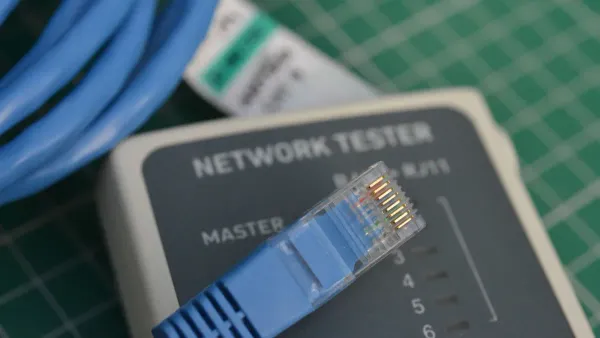
Knowing how to spot and solve issues with an RJ45 connector can save a lot of time. Many network problems originate from the physical layer, where the cable and connectors form the electrical foundation for data transmission. Simple visual checks and troubleshooting steps can often identify the root cause of a poor connection.
Identifying a Bad RJ45
A visual inspection is the first step in diagnosing a faulty RJ45 connector. Physical damage directly impacts the electrical integrity of the connection. A common problem is a broken locking tab, which prevents the RJ45 from seating securely in the ethernet port. This leads to intermittent connections.
Other visual signs of a bad RJ45 include:
- Bent or Popped Pins: The golden contacts on the RJ45 connector should be perfectly aligned. A raised or bent pin will fail to make proper electrical contact.
- Frayed Cable Entry: The ethernet cable jacket should enter the connector body smoothly. Fraying indicates strain and potential damage to the internal wiring.
- Nicked Conductors: Visible copper or slices in the insulation of the small wires inside the connector point to improper stripping. This can cause short circuits.
- Excessive Untwist: The wire pairs inside the cable should remain twisted as close to the connector as possible to prevent interference.
Connection Troubleshooting Steps
When a network fails, a few simple steps can help isolate the problem. First, check the ethernet port's indicator lights. A solid light typically means a good link, while a flashing light shows data activity. No light often points to a physical layer issue with the cable or connector.
A straightforward troubleshooting method involves these steps:
- Reseat the Cable: Unplug the RJ45 connector and plug it back in firmly. Listen for a "click" to ensure the locking tab engages.
- Test with Another Device: Connect the same ethernet cable to a different device. If the new device connects successfully, the problem likely lies with the original device's port or its integrated circuits.
- Use a Different Cable: If the connection still fails, try a known-good cable. This helps determine if the original cable or its RJ45 ethernet connectors are faulty.
Choosing RJ45 Ethernet Connectors
The quality of RJ45 ethernet connectors is critical for high-performance networks. High-quality connectors use superior materials to ensure a stable electrical circuit and protect data integrity. The most important feature is the thickness of the gold plating on the contact pins.
| Feature | Low-Quality Connectors | High-Quality Connectors |
|---|---|---|
| Gold Plating | 3U" to 6U" (microinches) | 30U" to 50U" (microinches) |
| Contact Material | Iron with thin gold flash | Phosphor bronze with thick gold |
| Durability | Prone to corrosion and wear | Excellent corrosion resistance |
Thicker gold plating, often 50U", provides better durability and prevents corrosion, ensuring a reliable connection over many insertions. These high-quality connectors are essential for applications demanding high bandwidth, as they minimize signal loss and support the speeds of modern networks. Choosing the right RJ45 connector ensures your wiring can deliver the performance your network infrastructure was built for.
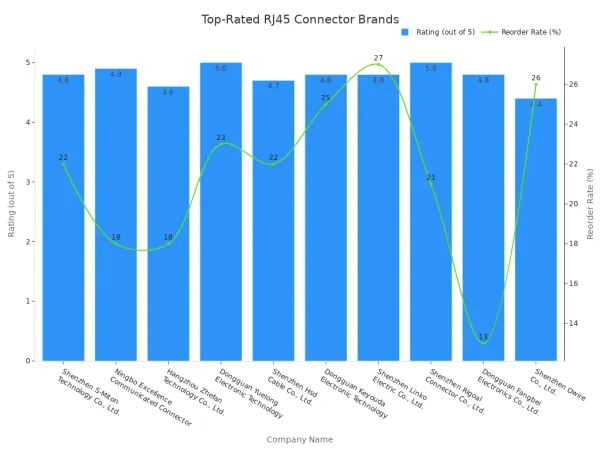
The RJ45 connector is a precision-engineered component. These connectors are vital for network reliability and high-speed data connections. The quality of the RJ45, its wiring, and the ethernet cable must match. This prevents performance bottlenecks in ethernet networks. A quality connector ensures the entire rj45 and ethernet system functions correctly for all applications.
💡 Take Action: Inspect the RJ45 ethernet connectors on your main devices. A quick check of these connectors, the cable, and the wiring can reveal hidden network problems. Ensure all connectors are secure to maintain stable connections.
FAQ
What is the difference between an RJ45 and an RJ11 connector?
An RJ45 connector has eight pins for network data. An RJ11 connector has four or six pins for telephone lines. The RJ45 is larger and handles more complex electrical signals for computer networks. The RJ11 is smaller and used for analog voice signals.
Can you plug an RJ11 cable into an RJ45 port?
Yes, an RJ11 plug fits inside an RJ45 port. However, this can damage the port's outer pins. The telephone line's electrical current can also harm the network device's integrated circuits. It is best to avoid this practice to protect your equipment.
Why are there different categories of RJ45 connectors?
Different categories support different network speeds. A Cat6a connector, for example, handles faster data rates than a Cat5e connector. Using the correct category ensures the connector's electrical properties match the cable, preventing a performance bottleneck for the device's circuits.
What are common applications of rj45 connectors?
The primary use is for wired Ethernet networks. This connects computers, routers, and switches. Other applications include industrial control systems and professional audio equipment, where reliable data transmission between electronic devices is essential.