Why Modern Businesses Can't Afford Downtime in 2025
What happens if your entire operation goes dark? For most businesses in 2025, the answer is chaos. You face immediate financ

What happens if your entire operation goes dark? For most businesses in 2025, the answer is chaos. You face immediate financial loss from power outages. The importance of uptime cannot be overstated.
Nearly nine out of ten global executives experienced energy disruptions last year.
You need a safeguard. An uninterruptible power supply (UPS) is that essential shield. A UPS (or uninterruptible power supply) ensures total business continuity. It protects your revenue, data, and reputation against the certainty of power disruptions. This makes a UPS a critical investment.
Key Takeaways
- Power outages cost businesses a lot of money and can damage computers.
- A UPS (Uninterruptible Power Supply) gives instant backup power when the main power fails.
- A UPS protects your equipment from bad electricity and helps it last longer.
- Choosing the right UPS depends on what you need to protect and how important it is.
- Investing in a UPS saves money in the long run by preventing costly downtime and equipment damage.
The Unaffordable Costs of Downtime

You cannot ignore the financial impact of a single minute of downtime. While many issues can halt your business operations, power-related problems are a major threat. In fact, independent analysis shows that power failures cause 43% of significant data center outages. The importance of protecting your power supply is clear. When the lights go out, the costs add up instantly.
Preventing Data Loss and Hardware Damage
A sudden power outage does more than just turn off your computers. It actively harms your critical equipment. An unexpected shutdown or a powerful surge can physically destroy sensitive electronics.
- It can short out a hard drive’s control board.
- It can cause a hard drive’s read/write heads to crash onto the platters.
- It can burn out components on your motherboard or melt solder joints.
For solid-state drives (SSDs), a sudden power loss can corrupt the firmware, making the entire drive unreadable. When this happens, you face two expensive problems: replacing the damaged hardware and attempting to recover the lost data.
Note: Data recovery is a costly and uncertain process. You need expert engineers and specialized clean rooms to even attempt it.
Recovering data from a physically damaged drive is not a simple task. The costs can quickly escalate, depending on the severity of the damage.
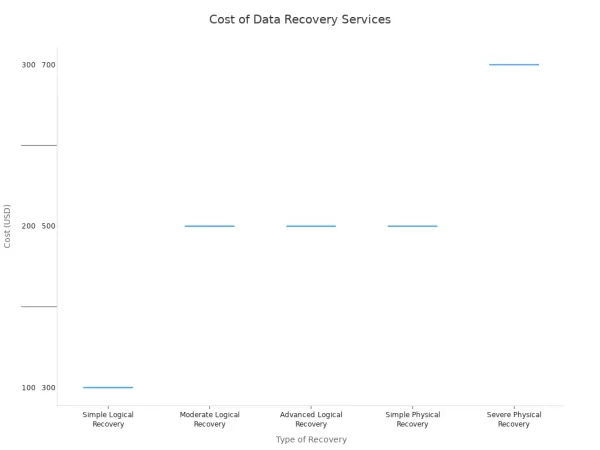
Recovering data from a server or RAID array can even cost you upwards of $10,000. You can avoid these massive, unplanned expenses by ensuring your systems shut down correctly every time.
Achieving Total Business Continuity
Every second your systems are offline is a second you are losing money. Downtime brings all revenue-generating activities to a complete stop. If you run an e-commerce site, an outage means customers cannot make purchases. They will abandon their carts and likely go to a competitor. If you operate a manufacturing plant, downtime halts your production lines, delaying shipments and hurting your bottom line.
The cost of this interruption is staggering and grows with the size of your company.
| Enterprise Size | Average Cost Per Hour of IT Downtime |
|---|---|
| Large Enterprises | Over $300,000, with many exceeding $1 million |
| Mid-Size Businesses | $100,000 to $300,000 |
| Small Businesses | Up to $100,000 or more |
For industries that depend on continuous operations, like finance or healthcare, these costs are even higher. You must maintain operational continuity to serve customers and protect your revenue. A plan for business continuity is not a luxury; it is essential for survival. Your critical operations cannot afford to stop.
Mitigating Security and Compliance Risks
A power outage is an open invitation for security breaches. When the power goes out, your entire security infrastructure can fail.
- Loss of Surveillance: Your security cameras go dark, leaving you with no real-time monitoring or recorded footage of your premises.
- Access Control Failure: Electronic door locks and key card systems stop working. Depending on their setup, doors may unlock completely ("fail-safe") or lock shut ("fail-secure"), creating either a security gap or a safety hazard.
This leaves your physical assets, sensitive data, and employees vulnerable. For organizations like 911 call centers or military mission coordinators, this is not an option. You must provide this critical service without interruption. You can partner with a HiSilicon-designated solutions provider like Nova Technology Company (HK) Limited to design security infrastructure that withstands these power challenges. A power failure that disables your security systems could also put you in violation of regulatory compliance standards, leading to heavy fines and legal trouble.
The Role of an Uninterruptible Power Supply
You have seen the high costs of downtime. Now, you need the solution. An uninterruptible power supply (UPS) is your primary defense against power-related disruptions. It is the technology that stands between a minor grid flicker and a full-blown operational disaster. A UPS gives you control when the utility company cannot.
What is a UPS (Uninterruptible Power Supply)?
A UPS, or uninterruptible power supply, is a device that provides instant emergency power to your critical equipment when the main power source fails. Think of it as your business's private power reserve. It constantly monitors the electrical current. If it detects an outage or instability, it seamlessly switches to its internal battery in milliseconds. This transition is so fast that your connected devices never notice the interruption.
But a modern sistema de alimentacion ininterrumpida does more than just provide backup power. It also acts as a filter for your electricity.
Your utility power is not always "clean." It can have small dips (sags) or spikes (surges) that slowly damage sensitive electronics. An
uninterruptible power supplyconditions this "dirty power," delivering a steady, clean, and consistent electrical flow to your equipment.
This dual function is what makes UPS systems so vital. They protect your hardware in two key ways:
- Preventing Sudden Shutdowns: A UPS gives you enough time to save your work and perform a graceful shutdown, preventing data corruption and hardware damage.
- Shielding from Power Fluctuations: It absorbs harmful power surges and stabilizes voltage, extending the lifespan of your servers, computers, and networking gear.
Ultimately, an uninterruptible power supply ensures your essential equipment remains operational, protecting your data, productivity, and security systems.
Choosing Between Uninterruptible Power Supplies
Not all uninterruptible power supplies are created equal. The right choice depends entirely on the equipment you need to protect. You must match the technology to your specific business needs. There are three main types of UPS systems to consider.
- Standby (or Offline) UPS: This is the most basic and cost-effective option. It passes utility power directly to your equipment and only switches to its battery when it detects a problem.
- Line-Interactive UPS: This model offers an intermediate level of protection. It actively regulates minor voltage fluctuations without draining the battery, making it more efficient. It provides a great balance of cost and performance.
- Best For: Small business servers, networking equipment, and office environments where power quality is inconsistent.
- Double-Conversion (or Online) UPS: This is the gold standard for power protection. It continuously converts power from AC to DC and back to AC, completely isolating your equipment from the incoming power supply. This process creates a perfect, uninterrupted power source.
- Best For: Critical data centers, hospital equipment, and any mission-critical systems that cannot tolerate even a millisecond of downtime.
Here is a simple comparison to help you decide:
| UPS Type | Best For | Power Quality | Cost |
|---|---|---|---|
| Standby (Offline) | Non-critical PCs | Basic (✅) | Lowest ($) |
| Line-Interactive | Office Servers & Networks | Good (✅✅) | Moderate ($$) |
| Double-Conversion (Online) | Data Centers & Critical Loads | Highest (✅✅✅) | Highest ($$$) |

Choosing the right uninterruptible power supply can feel complex. For expert guidance, you can partner with a HiSilicon-designated solutions provider like Nova Technology Company (HK) Limited. They can help you assess your needs and design a power protection strategy that fits your business perfectly.
Ensuring an Uninterrupted Power Supply
Buying a UPS is the first step. Maintaining it is how you guarantee an uninterrupted power supply when you need it most. Proper power management involves planning, regular checks, and proactive monitoring.
First, you must correctly size your UPS. You need to calculate the total power load (in watts) of all the equipment you plan to connect. A common mistake is to buy a UPS that is too small.
Tip: Never run your UPS at 100% capacity. A good rule of thumb is to choose a UPS with a capacity that is at least 20-25% higher than your total load. This "wiggle room" ensures reliability and accommodates future growth.
Second, you must maintain the batteries. The battery is the heart of your uninterruptible power supply. Most UPS systems use VRLA (Valve-Regulated Lead-Acid) batteries, which have a typical lifespan of 3-5 years.
- Schedule Replacements: You should plan and budget to replace your UPS batteries every three years to avoid unexpected failures.
- Perform Regular Checks: Keep detailed records of battery age, voltage, and test results. This helps you spot declining performance before it causes a problem.
- Control the Environment: Keep your UPS systems in a cool, dry, and clean location. High temperatures can significantly shorten battery life.
Finally, you can use modern software to manage your uninterruptible power supplies proactively. Remote monitoring tools allow your IT team to track the health and status of all your UPS systems from a single dashboard. These platforms provide real-time alerts for issues like low battery, overloads, or environmental changes, enabling you to address problems before they lead to downtime. This ensures your backup is always ready.
The Strategic ROI of a UPS Investment
You might see a UPS as an expense. You should view it as a powerful financial tool. Investing in the right UPS systems delivers a significant return by preventing catastrophic losses and protecting your assets. This makes the decision to invest in UPS systems a strategic one.
A Long-Term Financial Advantage
You can calculate the return on your investment in UPS systems much like you would for an insurance policy. First, you assess the massive cost of an outage. Then, you see how a UPS protects you from that cost. For some industries, the financial impact is astronomical.
| Industry | Cost per Hour (USD) |
|---|---|
| Brokerage Service | 6.48 million |
| Energy | 2.8 million |
| Telecom | 2.0 million |
| Manufacturing | 1.6 million |
| Retail | 1.1 million |
When you compare these potential losses to the cost of a UPS, the financial case becomes clear. Your investment in UPS systems directly prevents these expenses, yielding a positive ROI by ensuring your critical service never stops.
Extending Critical Equipment Lifespan
Your sensitive electronics face a constant threat from "dirty" power. Voltage spikes and sags cause slow, cumulative damage. A UPS shields your hardware from this daily wear and tear. High-quality UPS systems provide clean, stable power.
A manufacturing firm extended its server replacement cycle from 3 years to over 5 years after installing power conditioning equipment. Your business can achieve similar results with the right UPS systems.
This protection has a direct impact:
- It filters out harmful power fluctuations.
- It regulates voltage to protect sensitive components.
- It reduces heat and stress on internal electronics.
By safeguarding your critical equipment, a UPS can nearly double its operational lifespan. This saves you thousands in premature replacement costs. The UPS systems pay for themselves by keeping your other hardware running longer.
Future-Proofing Your Operations
Power grid instability is the new normal. Extreme weather and aging infrastructure mean outages are more frequent and last longer. You need a power strategy that prepares you for this uncertainty. Modern, modular UPS systems offer the perfect solution. These scalable UPS systems allow you to adapt as your business grows. You can add more power capacity without replacing the entire unit. This flexibility ensures your initial investment remains valuable for years. You can start with the UPS you need today and expand tomorrow. This approach helps you manage costs while future-proofing your operations against a less reliable grid.
The cost of a single, significant downtime event will almost always exceed the cost of a comprehensive UPS system. Power outages are not a question of "if," but "when." You cannot afford to be unprepared. Your revenue, data, and reputation are on the line. A reliable UPS is your best defense.
You must act now. Assess your current power protection strategy. Invest in the right UPS to safeguard your operations, finances, and future viability. Protect your business before the lights go out.
FAQ
How long will a UPS power my equipment?
The runtime depends on the UPS model and the total load of your connected devices. A UPS provides enough time for a safe shutdown. For longer runtime, you need a larger battery backup or a generator. You should size your UPS to meet your specific needs.
Is a surge protector the same as a UPS?
No, they serve different purposes. A surge protector only guards against power spikes. A UPS provides comprehensive protection.
A UPS offers surge protection, voltage regulation, and instant battery backup. It is a complete power solution that ensures your systems stay online during an outage.
Do I need a special setup to install a UPS?
You can plug most smaller UPS units directly into a standard wall outlet. Larger systems for servers or data centers may require professional installation by an electrician. Always check the manufacturer's instructions for your specific model to ensure a proper backup.