Upgrade Your PC and Save on Electricity with 80 Plus Gold
Yes, the answer to "does 80 gold psu save electricity" is a clear one. A gold psu operates with superior energy ef
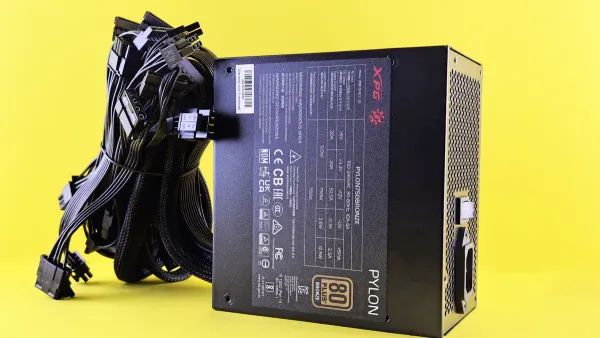
Yes, the answer to "does 80 gold psu save electricity" is a clear one. A gold psu operates with superior energy efficiency. You get more power for your components and waste less energy as heat. This improved efficiency directly lowers your electricity bill. A more efficient power supply means less wasted power, as shown below.
| PSU Certification | Waste Heat at 50% Load |
|---|---|
| 80 Plus Bronze | 15% |
| 80 Plus Gold | 10% |
This difference in efficiency makes a gold psu a smart investment for your PC.
Key Takeaways
- An 80 Plus Gold power supply saves electricity. It changes power from the wall into power for your computer. It wastes less energy as heat.
- Gold power supplies make your computer run cooler and quieter. Less wasted energy means less heat inside your computer. This helps your computer parts last longer.
- Upgrading to a Gold power supply saves you money over time. It costs more at first, but it lowers your electricity bill. The savings can pay for the extra cost in a few years.
- The 80 Plus Gold rating offers a good balance of cost and efficiency. It is a smart choice for most computer users. It gives you good savings without being too expensive.
So, Does 80 Gold PSU Save Electricity?
You now know the short answer is "yes." Let's explore exactly how a Gold PSU achieves this and what it means for your computer and your wallet. The magic lies in understanding power supply efficiency and how a small percentage difference can lead to big results. Answering "does 80 gold psu save electricity" starts with looking at the PSU's core job.
The Basics of Power Supply Efficiency
Your PC's power supply unit (PSU) performs a critical task. It takes alternating current (AC) from your wall outlet and converts it into direct current (DC) for your sensitive computer components. This conversion is a multi-step process.
- Rectification: The PSU first converts the AC power, which flows back and forth, into a pulsating DC power that flows in one direction.
- Filtering: Next, it uses large capacitors to smooth out the pulsating DC, turning it into a more constant and stable voltage.
- Regulation: Finally, a regulator ensures the output voltage is precise and steady, protecting your components from power fluctuations.
This process is not perfect; some energy is always lost as heat. The measure of how well a PSU converts AC to DC is its efficiency. Modern PSUs also use a feature called Power Factor Correction (PFC) to improve power supply efficiency. Active PFC, found in most quality units today, significantly enhances efficiency and reduces energy waste on the power grid.
| Feature | Passive PFC | Active PFC |
|---|---|---|
| PF Value | 70% to 80% | Over 95% |
| Efficiency | Lower due to heat and voltage drops | Enhanced, maximizing power distribution |
| Voltage Input | Manual switching required | Automatically corrects for input voltage |
A gold psu almost always uses Active PFC to achieve its high energy efficiency rating.
Understanding the 80 Plus Rating System
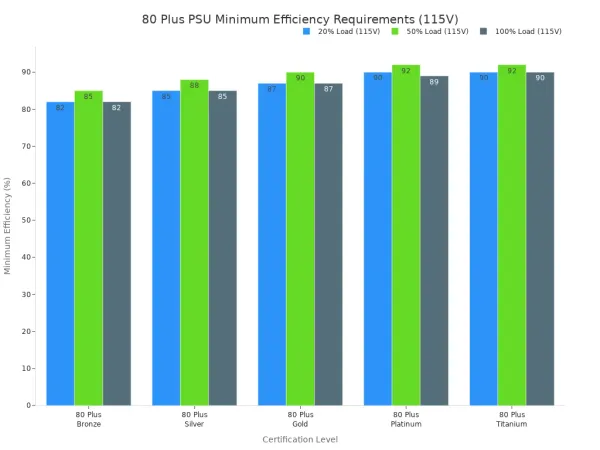
How do you know if a PSU is efficient? You look for the 80 Plus certification. This is a voluntary program managed by CLEAResult that tests and certifies the efficiency of computer power supplies. The 80 Plus rating tells you the minimum efficiency a PSU must maintain at different load levels (20%, 50%, and 100%).
A higher rating means better efficiency. A gold psu must be at least 87% efficient at 20% and 100% load, and 90% efficient at 50% load.
80 Plus Minimum Efficiency (115V)
| Certification | 20% Load | 50% Load | 100% Load |
|---|---|---|---|
| 80 Plus Bronze | 82% | 85% | 82% |
| 80 Plus Silver | 85% | 88% | 85% |
| 80 Plus Gold | 87% | 90% | 87% |
| 80 Plus Platinum | 90% | 92% | 89% |
| 80 Plus Titanium | 90% | 92% | 90% |
As you can see, the jump from Bronze to Gold is significant. This difference directly impacts how much power your PC pulls from the wall to operate.
How Wasted Energy Becomes a "Heat Tax"
The energy a PSU wastes during conversion does not simply vanish. It turns into heat. Think of this wasted energy as a "heat tax" you pay for inefficiency. A less efficient PSU generates more heat inside your PC case.
This extra heat is a major problem for two reasons:
- Component Damage: Heat is the number one enemy of electronics. Consistent exposure to higher temperatures accelerates wear and tear on your CPU, GPU, and other parts, potentially shortening their lifespan.
- More Noise: Your PC's fans must spin faster to push the extra heat out of the case. Faster fans create more noise, making your computer louder during everyday use and gaming sessions.
By choosing a gold psu, you reduce this heat tax, leading to a cooler, quieter, and more reliable system.
Calculating Your Potential Savings 💰
The most compelling reason to ask "does 80 gold psu save electricity" is to find potential savings on your power bill. Let's calculate the real-world difference.
Scenario: Your PC components require 300 watts (W) of power under load. You use your PC for 6 hours per day. The average cost of electricity is $0.15 per kilowatt-hour (kWh).
Step 1: Calculate Wall Power Draw
- Standard 82% Efficient PSU (Bronze): To deliver 300W, it pulls
300W / 0.82 = 366Wfrom the wall. - 90% Efficient Gold PSU: To deliver 300W, it pulls
300W / 0.90 = 333Wfrom the wall. - Difference: The Gold PSU pulls 33W less from the wall to do the same job.
Step 2: Calculate Daily Energy Savings
- You save 33 watts every hour. Over 6 hours, that is:
33W * 6 hours = 198 Watt-hours, or0.198 kWhper day.
Step 3: Calculate Your Financial Savings
- Daily Savings:
0.198 kWh * $0.15/kWh = $0.03 per day - Monthly Savings:
$0.03 * 30 days = $0.90 per month - Yearly Savings:
$0.90 * 12 months = $10.80 per year
While $10.80 per year might not seem like a fortune, this calculation is for a PC under a moderate load. If you are a heavy gamer or content creator with a more powerful system, or if electricity costs are higher in your area, your savings will be even greater. This demonstrates how upgrading your PSU directly lowers your electricity bill over time. The 80 plus certification provides a clear path to better efficiency and a lower electricity bill.
Gold PSU: Cost vs. Long-Term Value
You see the immediate power supply savings on your bill. Now, you should consider the upfront cost. A Gold PSU costs more than a Bronze unit. This higher price is an investment in efficiency and quality. Let's look at how this investment pays you back over time.
Calculating the Break-Even Point
The break-even point is when your energy savings equal the extra cost of the Gold PSU. You can calculate this point easily.
Let's use our previous savings calculation of $10.80 per year.
Example Scenario:
- A 650W Bronze PSU costs: $60
- A 650W Gold PSU costs: $90
- Price Difference: $30
Calculation:
Price Difference / Yearly Savings = Break-Even Point$30 / $10.80 per year = 2.78 years
In this scenario, your gold psu pays for itself in under three years. After that, the $10.80 you save every year is pure profit. The long lifespan of a quality PSU means you will enjoy these savings for many years.
Benefits of a More Efficient Power Supply
The value of a more efficient power supply goes beyond your electricity bill. The higher efficiency and build quality bring major benefits to your entire system. A gold psu delivers cleaner, more stable power to your sensitive components. This superior voltage regulation prevents fluctuations that can cause crashes or damage your hardware over time.
Better parts are used to build units with higher efficiency ratings. Manufacturers often use superior components to meet the strict Gold standard.
- Many Gold PSUs use high-quality, 100% Japanese 105°C capacitors.
- These premium parts ensure consistent power delivery and long-term reliability.
This focus on quality means a gold psu generates less waste heat. Less heat leads to a cooler and quieter PC because your fans do not need to work as hard. This improves system stability and extends the lifespan of your CPU, GPU, and the power supply itself.
Bronze vs. Gold: A Cost-Benefit Analysis
When choosing a PSU, you want the best performance for your money. A Gold PSU often hits the perfect sweet spot between cost and efficiency for most builders and gamers. While a Bronze unit is cheaper upfront, its lower efficiency leads to higher long-term operational costs.
Higher-rated power supplies like Platinum and Titanium offer even better efficiency, but the gains become smaller. The price increase for these units is often significant, making them better suited for professional workstations that run under heavy load 24/7.
| 80 Plus Rating | 115V Efficiency at 50% Load | Best For |
|---|---|---|
| Gold | 90% | Excellent balance of price and power supply efficiency. |
| Platinum | 92% | Marginal efficiency gain at a premium price. |
| Titanium | 94% | Extreme efficiency for professional or server use. |
For most users, the jump from Bronze to Gold provides the most noticeable savings and benefits. You get a significant boost in energy efficiency without the extreme cost of a Platinum or Titanium unit. This makes the gold psu a smart investment that balances initial cost with long-term savings and system reliability.
Choosing the Right 80 Plus Certification
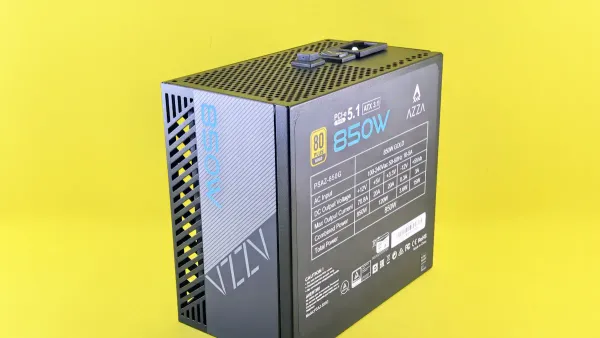
Selecting the right power supply involves more than just picking the highest rating. You need to balance efficiency, wattage, and brand reputation to find the perfect fit for your system. Making the right choice ensures you get the performance you need without overspending.
Matching Wattage to Your PC Build
You must first determine how much power your PC needs. A PSU is most efficient when running at about 50% of its maximum rated load. Buying a PSU with too much wattage means it will operate at a lower, less efficient point on the curve. You can use online tools to estimate your power draw accurately.
Helpful PSU Calculators:
These calculators help you find your system's peak power consumption. A good rule of thumb is to add about 30% overhead to this number. For a system needing 500 watts, a 650W gold psu provides a great buffer for peak loads and future upgrades. This strategy keeps your PSU operating near its peak efficiency.
When to Upgrade to Gold or Higher
You should consider upgrading if your current PSU shows signs of failure. Spontaneous reboots, system freezes, or smoke are clear indicators that you need a replacement. A new gold psu is an excellent choice for a daily-use PC, offering a great balance of cost and long-term savings. However, if you rarely use your computer, the high upfront cost may not be worth the small energy savings. For most gamers and builders, the jump from Bronze to a Gold 80 plus certification offers the most significant value.
The Importance of Reputable Brands
A brand's reputation matters. Top-tier manufacturers build their power supplies with higher-quality components, leading to better reliability and performance.
- Corsair
- Seasonic
- EVGA
- Cooler Master
These brands consistently earn praise for their durability and efficiency. Before you buy, you can verify any model's 80 plus certification on the official CLEAResult website. This ensures you get the quality you paid for. Choosing a credible technology partner is always a smart move. For instance, a company like Nova Technology Company (HK) Limited is a HiSilicon-designated solutions partner, showing its established credibility. This same principle applies when you select a PSU with a trusted 80 plus certification.
The answer to "does 80 gold psu save electricity" is a definite yes. Upgrading to a gold psu is a smart investment. The higher initial cost pays for itself through long-term savings on your electricity bill. You also gain significant system benefits.
- Cooler Operation: Less wasted energy means less heat.
- Quieter PC: Fans run slower and quieter.
- Improved Reliability: Stable power protects your components.
For most PC builders, a gold psu offers the perfect balance of price, performance, and efficiency.
FAQ
Is a Gold PSU always better than a Bronze one?
Yes, a Gold PSU is always more energy-efficient than a Bronze PSU. It wastes less power as heat. This efficiency saves you money on your electricity bill and helps your PC run cooler and quieter.
How long does a Gold PSU last?
A quality Gold PSU can last for many years. Most reputable brands offer warranties from 7 to 10 years. Their superior components and cooler operation contribute to a very long lifespan, making them a great long-term investment.
Do I need a Gold PSU for a budget PC?
You do not strictly need a Gold PSU for a budget build. A Bronze PSU will work. However, if you use your PC often, a Gold PSU can save you money over time and is a worthwhile upgrade.
What happens if my PSU wattage is too low? 😟
A PSU with insufficient wattage will struggle to power your components. This can cause your system to crash, reboot unexpectedly, or fail to turn on. You should always choose a PSU with enough power for your build.
Tip: Use an online PSU calculator to find the right wattage for your PC. This ensures your system has stable power.