Unlocking Productivity with NEARLINK Wireless Solution for Gaming and Office
Imagine using a nearlink wireless solution that makes work and play better. You get smooth, fast wireless connections on all your devices.
Imagine using a nearlink wireless solution that makes work and play better. You get smooth, fast wireless connections on all your devices. The latency is as low as 20 microseconds. The data rates can go up to 1.2 Gbit/s. You feel every action happen right away. This new wireless standard lets you set up and control many devices easily. The nearlink wireless solution creates a new standard for wireless. It gives you a fast and personal experience.
Key Takeaways
-
NEARLINK gives very fast response and quick data speeds. Your devices react right away for smooth gaming and work.
-
The solution keeps connections strong and steady, even in crowded places. You can trust your devices to stay connected without losing signal.
-
It is easy to pair and use with many devices. You can connect and switch devices fast, with no extra dongles or wires.
-
NEARLINK helps you get more done with smart tools for multitasking and file sharing. It also makes remote meetings clear at home or in the office.
-
Gamers get no lag, quick actions, and steady connections. This helps you win games and enjoy cloud gaming.
NEARLINK Wireless Solution Overview
Next-Gen Wireless Technology
The nearlink wireless solution lets you talk to devices nearby in a new way. It uses special methods to send signals fast and make sure they work well. You get almost no delay, only 20 microseconds. This is much faster than Bluetooth. It is about 50 times quicker. That makes it great for gaming and office work. Nearlink uses smart rules to keep your connection strong. Even in busy places, it stays steady. You can count on it to work 99.999% of the time. You will not lose your connection, even with lots of devices around. Nearlink can send lots of data fast. You can move big files or watch videos without waiting. Smart chips and new ways to send signals help save battery. Your devices can last longer.
Here are some main technical features:
|
Specification |
Description |
|---|---|
|
Ultra-Low Latency |
20 microseconds, 50x faster than Bluetooth. |
|
High Data Rate |
Up to 300 Mbps, 12x faster than Bluetooth 5.3. |
|
Energy Efficiency |
Uses 60% less power than Bluetooth Low Energy. |
|
Network Density Support |
Handles 200 devices per square meter without performance loss. |
|
Quantum-Resistant Encryption |
Advanced security with zero successful interception in pilot tests. |
|
Dual-Mode Architecture |
Works with Bluetooth and Wi-Fi for seamless communication. |
Sparklink and Ecosystem Integration
Sparklink is a big part of the nearlink wireless solution. It helps you connect your devices fast and easy. You can use sparklink to pair things like your keyboard and mouse. You do not need extra parts. Sparklink lets you send signals straight to your devices. You do not need dongles or wires.
You can use sparklink to link many smart devices at the same time. It can handle up to 10,000 connections in 100 meters. This makes it simple to run a smart office or gaming room. Sparklink is strong against interference. Your wireless signals stay clear, even if there are lots of other signals.
Nearlink also works with smart systems like HarmonyOS. You get fast connections and easy control of your devices. The protocol uses smart planning and new ways to send signals. This keeps your connection smooth and steady. With sparklink, you get a smart and connected way to use short-range wireless.
For more technical details and real-world examples of the NEARLINK wireless mouse and keyboard solution, please visit the official solution page: https://ic-online.com/nearlink-mouse-keyboard-solution
Key Features for Productivity
Ultra-Low Latency Performance
You want your devices to react right away. NEARLINK gives you very low latency, so every click and key press feels fast. There are tests that show how quick it is. The Polling Rate Test checks how often your mouse or keyboard sends data. If the polling rate is higher, there is less delay. The GPDL Tester checks how fast buttons respond. The Prometheus 82 Gamepad Punch Tester acts like real use and measures button and joystick speed. These tests prove NEARLINK is super fast, sometimes as quick as 20 microseconds.
You get a real 4K report rate. This means your mouse or keyboard can send data up to 4000 times each second. You will see smoother moves and faster reactions, especially in games or when working with graphics. Low latency helps you do better in games and work faster in the office. You do not need to worry about lag or missed actions. Your moves happen right away.
Tip: A higher polling rate and lower latency make your devices feel smooth and quick. NEARLINK’s low latency gives you a real edge.
Ultra-High Reliability and Stability
You need your wireless devices to work all the time. NEARLINK gives you strong reliability and steady connections, even in busy places. It uses special anti-interference technology. This keeps your connection strong, even if many devices are close by. You can trust NEARLINK to keep working, whether you are in a crowded office or at a gaming event.
Here is a table that shows how NEARLINK’s reliability and speed compare to older wireless tech:
|
Performance Metric |
Description |
|---|---|
|
Power Consumption |
60% lower than traditional wireless tech |
|
Data Transmission Speed |
6 times higher than Bluetooth |
|
Latency |
1/30th of Bluetooth latency |
|
Anti-Interference Improvement |
7 dB better for a more stable connection |
|
Coverage Distance |
Twice the range compared to traditional tech |
|
Network Connections |
Supports 10 times more simultaneous connections |
You get strong reliability because NEARLINK stops dropouts and keeps your devices linked. The system has high bandwidth, so you can move big files fast. You also get low latency, which is important for real-time work. NEARLINK’s steady connection means you can focus on your work or game without worrying about losing signal.
Easy Pairing and Multi-Device Support
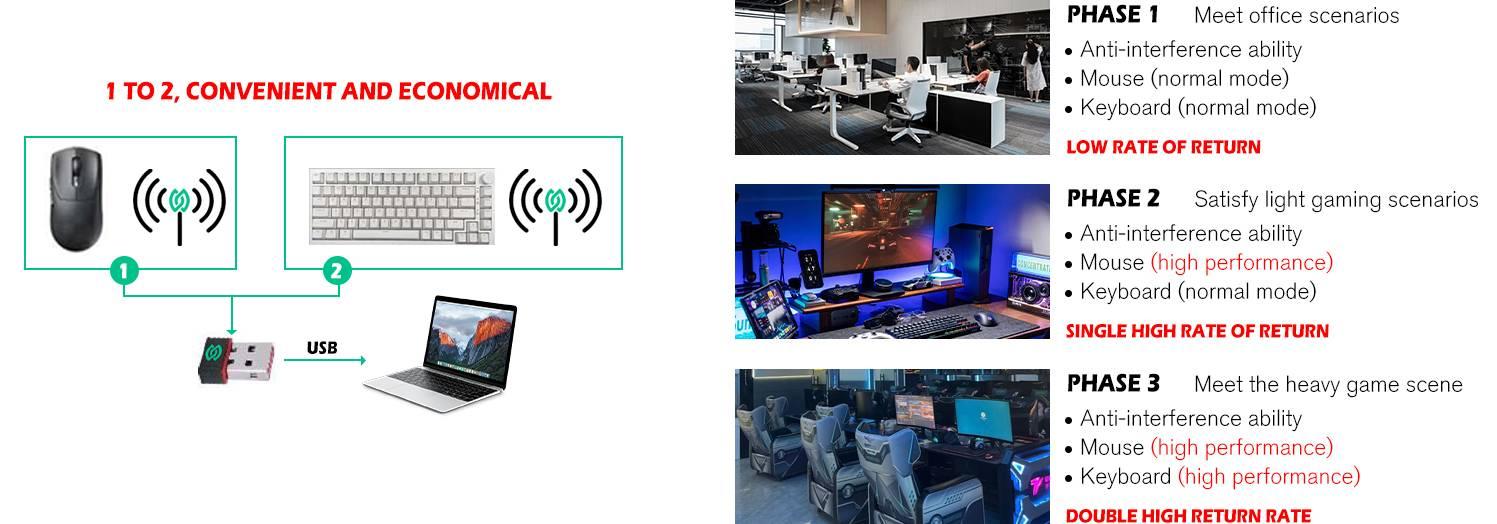
You want to connect your devices fast and easy. NEARLINK makes this simple with direct connection tech. You do not need extra dongles or wires. You can pair your keyboard and mouse straight to your computer, tablet, or phone. The sparklink feature lets you link to more than one device at once. You can switch between your PC and tablet with just one click.
Sparklink supports a 1-to-2 connection. This means you can use one keyboard or mouse with two devices at the same time. You can type on your laptop, then switch to your tablet without unplugging anything. Sparklink also works with the HarmonyOS system. You get smooth control and smart features on all your devices.
You can change your setup with NEARLINK’s PC host software. You can set new key functions, make macros, and change lighting effects. This lets you make your setup fit your needs. Sparklink makes it easy to handle your devices and settings.
-
Sparklink gives you:
-
Quick and easy pairing
-
Support for more than one device
-
Direct connection without dongles
-
Smart features with HarmonyOS
-
Custom options through PC software
-
You get the freedom to work and play your way. Sparklink and NEARLINK’s strong reliability keep your devices connected and working well. You can count on NEARLINK for smooth signals, low delay, and great performance every day.
Office Use Cases
Remote Meetings and File Sharing
You want your online meetings to go well. NEARLINK gives you smart tools to help connect with others. You can use it in your office or at home. The wireless solution keeps your calls clear and fast. You do not have to worry about calls dropping or slow video. NEARLINK is reliable, so your meetings stay on schedule. You can send files to your team quickly. The system lets you send documents from home to the office in seconds. You get strong reliability, so your files always reach the right people.
Tip: Try NEARLINK to link smart devices at home. It makes sharing files and talking easy. You will see how reliable it is in every meeting.
You can trust NEARLINK to keep your office running well. The connection works in busy offices and quiet homes. You get the same strong signal everywhere. The smart technology helps you focus on work, not fixing problems. You can use NEARLINK to link smart screens and speakers at home. This makes meetings more fun and helps you talk better.
Multitasking and Device Management
You often need to do many things at once. NEARLINK gives you smart features for multitasking. You can control many devices at the same time. This works in your office and at home. The system lets you switch from your computer to your tablet with one click. You do not need to set up new links or reconnect. NEARLINK keeps your devices connected all the time.
You can manage smart devices at home easily. The software lets you set up your workspace the way you want. You can change settings, move files, and control smart lights or speakers. NEARLINK keeps everything working together. You do not waste time fixing broken links. You get smart control and strong reliability every day.
Here is a table to show how NEARLINK helps with multitasking at home and in the office:
|
Feature |
Benefit in Homes |
Benefit in Office |
|---|---|---|
|
Smart Device Control |
Manage all smart devices |
Control office equipment |
|
Reliability |
No dropped connections |
Stable communication |
|
Easy Communication |
Talk to family or team |
Share files instantly |
You can see how smart technology and strong signals make work easier. NEARLINK brings smart solutions to your home and office. It helps you stay productive and connected.
Gaming Advantages
Lag-Free Input and Responsiveness
You want your game moves to happen right away. NEARLINK wireless solution helps you play better. It uses a 4K polling rate. This means your mouse or keyboard sends signals 4000 times each second. This high rate makes latency lower. Your actions show up fast. You do not feel any lag while playing.
Latency is very important in gaming. NEARLINK wireless solution has latency about 1/30th of Bluetooth. You get feedback almost instantly. Tests on devices like the BEITONG Asura 2 Pro Plus show button latency from 5.68 ms to 29.63 ms. The speed depends on how you connect. Wired connections are even faster. But NEARLINK wireless is almost as quick. Polling rate and jitter tests show NEARLINK keeps your input smooth and steady. This really helps in real-time games.
Here is a table that shows how NEARLINK compares to other connection types:
|
Mode |
Polling Rate |
Latency Comparison |
Additional Features |
|---|---|---|---|
|
NearLink Wireless |
4000 Hz (4K) |
6x faster than Bluetooth; comparable to 2.4G with stronger anti-interference |
Reduces latency and eliminates stuttering for precise control |
|
USB Wired Mode |
8000 Hz (8K) |
Near-zero latency |
Ensures ultra-responsive wired control |
|
Bluetooth 5.0 |
1000 Hz (1K) |
Baseline for comparison |
Higher latency and less stable than NearLink |
Tip: Lower latency lets you react faster than others. You get smoother games and better control.
Multiplayer and Cloud Gaming
You can play multiplayer and cloud games without problems. NEARLINK wireless solution gives you a steady connection. Even if many people use the same network, it works well. The system keeps latency low. You do not miss any moves. You can play with friends or join online matches. Your input stays fast and reliable.
Cloud gaming needs quick reactions. NEARLINK helps you keep up with the game. You do not see delays or stuttering. The wireless solution can handle many devices at once. Everyone at home or in a gaming center can play together. You can switch between devices easily. The connection stays strong.
-
Benefits for multiplayer and cloud gaming:
-
Low latency for every player
-
Easy switching between devices
-
Reliable signals, even with many users
-
You get a better gaming experience with NEARLINK. Fast input, low latency, and strong connections help you win more games and have more fun.
Setup & Optimization
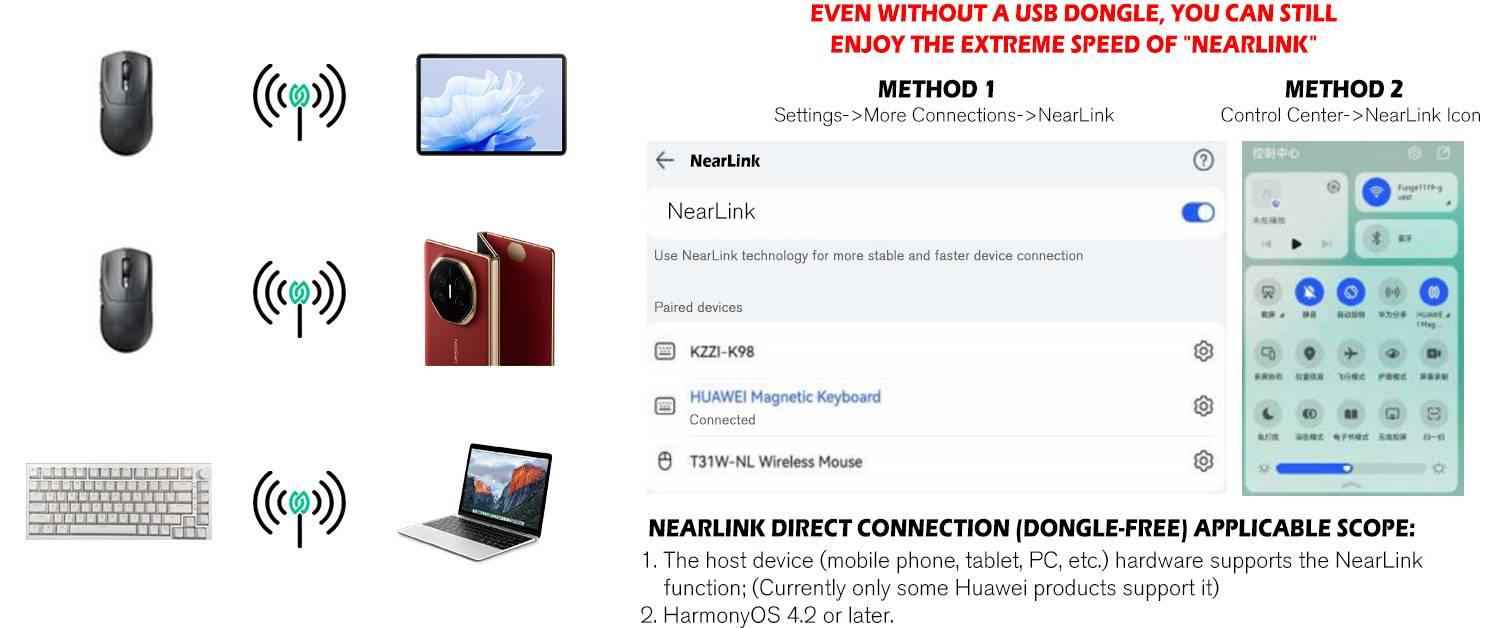
Quick Start Guide
Setting up your NEARLINK wireless solution is easy and fast. First, make sure your devices have the newest software. This helps them work their best. Turn on your NEARLINK mouse and keyboard. Find the pairing button on each device. Hold it until a light starts blinking.
Go to settings on your computer, tablet, or phone. Tap "Add Device" and pick your NEARLINK device from the list. If you use HarmonyOS, it will find your devices by itself. You do not need extra dongles or cables. The smart connection makes pairing simple and quick.
If you want to use one keyboard or mouse with two devices, use the 1-to-2 connection. Press the device switch button to change between devices. You can also use the PC host software to set custom keys, macros, and lights. This helps you make a smart workspace for work and games.
Tip: Keep your NEARLINK devices charged for the best wireless use.
Performance Tips
You can make your NEARLINK devices work better with a few steps. Keep your devices within 10 meters for a strong signal. Do not put big metal things between your devices. This keeps your connection strong.
Use the PC host software to check for firmware updates. Updates can make your devices better and add new features. If you see lag, restart your devices and connect again. For gaming, set your polling rate to 4K in the software. This gives you the fastest response.
Here is a quick troubleshooting table:
|
Issue |
Solution |
|---|---|
|
Device not pairing |
Restart both devices and retry |
|
Lag or delay |
Move closer and update firmware |
|
Connection drops |
Remove obstacles and re-pair |
Note: Smart troubleshooting helps you fix most problems fast.
You can do more at work and in games with NEARLINK. This wireless solution gives you very fast response and almost no downtime. It works well with all your devices. You get features like a 4K report rate and direct connection. You can also change settings easily to fit what you like. NEARLINK keeps your data safe with strong security and error correction. You always get a smooth experience. Try NEARLINK and see how it can make your work and games better.
FAQ
How do you pair NEARLINK devices with your computer or tablet?
You press the pairing button on your NEARLINK device. Open your device’s settings and select “Add Device.” Choose your NEARLINK device from the list. The connection happens quickly. You do not need extra dongles or cables.
Can you use one NEARLINK keyboard or mouse with two devices?
Yes, you can. NEARLINK supports a 1-to-2 connection. You press the device switch button to move between your computer and tablet. This feature helps you work or play on different devices without unplugging anything.
What makes NEARLINK better for gaming?
NEARLINK gives you ultra-low latency and a 4K polling rate. Your actions show up fast in games. You do not feel lag. The connection stays strong, even when many devices are nearby. This helps you play better and win more games.
How do you customize NEARLINK devices?
You use the PC host software. You can set new key functions, create macros, and change lighting effects. The software lets you adjust your device to fit your needs. You get a personal and smart setup for work or gaming.
Is NEARLINK safe to use in busy offices or gaming centers?
Yes, NEARLINK uses strong anti-interference technology. Your connection stays stable, even with many wireless signals around. You do not lose your connection. This makes NEARLINK a good choice for busy places.