Understanding GND A Guide to Circuit Stability
Let's define gnd. The ground (gnd) in your circuit is the common zero-volt reference. This single reference point acts as th

Let's define gnd. The ground (gnd) in your circuit is the common zero-volt reference. This single reference point acts as the foundation for your entire circuit. It is much more than just a wire.
A proper ground is the most critical factor for circuit stability. A good ground connection prevents noise and protects your components. Your circuit depends on a solid ground for safe and reliable operation.
Key Takeaways
- Ground (gnd) is the common zero-volt reference in a circuit. It is important for circuit stability, preventing noise, and protecting components.
- Ground has three main jobs: it is the 0V reference point, it provides a path for current to return, and it helps shield against noise and keeps you safe.
- Common ground problems include ground loops, floating grounds, and high-resistance paths. These can cause noise, damage, or safety risks.
- You can fix ground problems by using a single ground point, isolating connections, or ensuring a solid ground connection. Use thick wires and ground planes.
- Good grounding techniques, like star grounding or using a PCB ground plane, make circuits stable and reliable. They help prevent issues and improve performance.
Define GND: Core Functions and Purpose
To truly understand your electronics, you must first define gnd and its purpose. Ground is more than a symbol on a schematic; it serves three critical functions that ensure your circuit works correctly and safely. These functions are the foundation of all stable electronic designs.
The 0V Reference Point
Think of ground as the "sea level" for your electronics. Just as you measure the height of a mountain from sea level, you measure all voltages in a circuit from the ground. This common point is your zero-volt reference.
Voltage is always a measurement of potential difference between two points. Your circuit needs a stable, shared reference point so that a "+5V" signal means the same thing everywhere. Without a solid zero-volt reference, your components would have no common baseline. This can lead to major problems:
- Incorrect logic levels in digital circuits.
- Unstable signals due to voltage fluctuations.
- Inaccurate measurements from sensors.
Tip: A well-designed ground connection establishes a stable electrical benchmark. This ensures signal integrity, especially in high-speed digital circuits where rapid switching can cause issues. All devices in your system must share this common ground to maintain consistent potential differences.
In an ideal circuit, every ground connection would be at a perfect 0V. However, real-world wires and traces have resistance. This means different points in your ground network might have slightly different potentials, which can cause issues we will explore later. The goal is to make all ground connections as close to the same zero-volt reference as possible.
The Current Return Path
Electricity needs a complete loop to flow. Imagine a one-way road system. Cars can travel from a starting point to a destination, but they need a return route to complete the journey. In your circuit, ground provides this essential return path for current.
Current flows from your power source (like a battery), through your components, and then back to the source through the ground connections. Without this return path, the circuit is open, and no current can flow. This is why a bad ground connection can cause a circuit to fail completely.
The path that the return current takes depends on the type of signal:
- DC (Direct Current): For steady, low-frequency signals, the current follows the path of least resistance. It will take the most direct route back to the source.
- AC (Alternating Current): For high-frequency signals, the current follows the path of least impedance. This path is often directly underneath the signal trace on a printed circuit board (PCB), as this minimizes the loop area and reduces inductance.
A poor return path with high impedance can cause voltage drops, generate excess heat, and create noise that interferes with other parts of your circuit.
Noise Shielding and Safety
Your ground connection also acts as a protective shield and a critical safety feature. It protects your circuit from unwanted electrical noise and protects you from potential electric shock.
Noise Shielding Electronic devices are surrounded by electromagnetic fields from power lines, radio signals, and other nearby electronics. This is called electromagnetic interference (EMI). A large ground area, like a ground plane on a PCB, acts like a giant drain for this noise.
- It functions as a Faraday shield, absorbing and dissipating stray EMI before it can interfere with your sensitive components.
- It provides a low-impedance path for high-frequency noise from within your own circuit, directing it away from signal lines. This helps reduce both common-mode and differential-mode noise, ensuring cleaner signal transmission.
Safety Mechanism Finally, you must define gnd as a key safety element. In many devices, the ground is physically connected to the earth through the third prong on a power plug. This is called "earth ground."
If a fault occurs, such as a wire coming loose and touching a metal case, the ground provides a safe path for the excess current to flow away. This will typically trip a circuit breaker or blow a fuse, cutting off the power. Without a proper ground connection, that dangerous current could flow through you if you touched the device. Safety standards like IEC 60950 and its successor, IEC 62368-1, emphasize protective earth grounding to prevent electric shock.
Common GND Mistakes and Fixes

Even with a good understanding of ground, you can still make mistakes that destabilize your circuit. Knowing these common pitfalls helps you troubleshoot existing problems and design better electronics from the start. Let's explore three of the most frequent gnd issues: ground loops, floating grounds, and high-resistance paths.
Ground Loops
A ground loop happens when your circuit has two or more ground connections to the same point. These multiple paths create a "loop" of wire. This loop acts like an antenna, picking up magnetic fields from nearby power lines and electronics. The result is often a constant, annoying 60 Hz hum or buzz in audio systems and wavy lines on video displays.
The core problem is that different ground points are never at the exact same potential. A tiny voltage difference (ΔV) between two ground connections can cause a current to flow through the loop, creating noise.
Common Causes of Ground Loops You can accidentally create ground loops in many situations.
- Audio/Video Systems: Connecting multiple mains-powered devices (like an amplifier and a mixer) to different wall outlets can create a loop through the audio cable shields.
- USB and Cable TV: Some USB devices and most cable TV boxes do not isolate their ground, creating loops when you connect them to your other grounded equipment.
- PCB Design: On a printed circuit board, you can create loops by routing signals over gaps in a ground plane or by connecting a component's shield to ground at both ends.
How to Find a Ground Loop A standard multimeter is not effective for finding ground loops. Instead, you need tools that can measure AC signals. An oscilloscope with a differential probe can show you the noise voltage directly. You can also use a high-sensitivity AC leakage clamp meter to measure the unwanted current flowing through your ground connections.
Fixing Ground Loops The goal is to break the loop by creating a single return path for the current.
- Use a Single Ground Point: Plug all interconnected equipment into the same power strip or outlet. This helps ensure their ground references are as close as possible.
- Break the Loop with Isolation: You can use special components to pass the signal while breaking the electrical ground connection.
- Isolation Transformers: These pass audio or power signals using magnetic fields but physically separate the input and output ground connections.
- Digital or Optical Isolators: These devices convert the electrical signal to light (optical) or use capacitive/magnetic coupling (digital) to send it across a barrier. An example is the ADuM3160, a chip that isolates USB connections to prevent ground loops without needing special drivers.
Floating Grounds
A floating ground occurs when a device or circuit that should be connected to a stable ground reference is not. The gnd of the circuit is "floating" at an unknown voltage level instead of being tied to 0V. This is one of the most dangerous and unpredictable ground problems.
Without a solid ground connection, the voltage of your entire circuit can drift relative to its surroundings. This creates serious risks.
- Safety Hazard ⚡: A floating ground can turn a device's metal case live with dangerous voltage. In systems near water, like a boat dock, a disconnected shore ground can energize the water itself, creating a severe electric shock hazard for swimmers. A DC ground fault in a solar panel system can similarly cause fires or arc flashes.
- Component Damage: If you connect two devices, and one has a floating ground, a large potential difference can exist between them. The moment you connect them, a sudden rush of current can destroy sensitive components.
- Inaccurate Measurements: You should never "float" test equipment like an oscilloscope by defeating its safety ground. This practice is extremely dangerous, can damage the instrument over time, and makes your measurements unreliable because the equipment's capacitance interferes with the circuit under test.
Fixing a Floating Ground The fix is straightforward: ensure a solid ground connection. Always check that your equipment's safety ground is properly connected. For your projects, make sure your circuit's gnd is firmly tied to your power supply's ground. Never cut the third prong off a power cord.
High-Resistance Paths
An ideal ground would have zero resistance. In the real world, every wire and PCB trace has some resistance. A high-resistance path in your ground network can cause just as many problems as a broken one. When return current flows through this resistance, it creates a voltage drop (V = IR). This means your "ground" is no longer at 0V.
This "ground lift" can destabilize your entire circuit.
Causes of High Resistance Several factors can increase the resistance of your ground connections.
- Thin Wires or Traces: Using a wire gauge that is too small or a PCB trace that is too thin for the current it needs to carry.
- Corrosion: Rust or oxidation on connectors, terminals, or wires can dramatically increase resistance. Galvanic corrosion is especially common when you connect two different types of metals, creating a small battery effect that eats away at one of the metals.
- Poor Connections: Loose screws, bad solder joints, or poorly crimped connectors all create high-resistance points.
- Environmental Factors: For earth ground systems, resistance is affected by soil type, moisture level, and temperature. Dry, rocky, or frozen soil is highly resistive.
Effects on a Circuit A high-resistance ground path is especially bad for sensitive analog circuits. For example, if you are using a sensor, any voltage shift in the ground reference will be added to the sensor's signal, leading to incorrect readings. The circuit cannot distinguish between a real signal and noise caused by the faulty ground.
Fixing High-Resistance Paths You can minimize ground resistance by following good design practices.
- Use a Ground Plane: On a PCB, use a large, solid layer of copper as your ground. This provides a low-impedance path for all return currents. A good ground plane can reduce interference by up to 20 dB.
- Use Thick Wires and Traces: Always choose a wire gauge or trace width appropriate for the current. For power lines carrying 1A, a trace width of at least 20 mils (0.5 mm) is a good starting point.
- Keep Paths Short: Make your ground connections as short and direct as possible.
- Ensure Solid Connections: Solder joints properly, tighten terminal screws, and use high-quality connectors to ensure a reliable, low-resistance ground.
Practical Grounding Techniques
Understanding ground theory is the first step. Now, you can apply that knowledge with practical techniques. These methods will help you build a stable and reliable circuit from the ground up.
Star Grounding Method
The star grounding method is a powerful technique for preventing ground loops. In this setup, you connect all the ground points in your circuit to a single, central location. This point is often the power supply return. This creates a "star" pattern, with each ground connection forming a ray back to the center.
This method is highly effective for many circuits because it provides a single return path. Daisy-chaining your ground connections, where you link one component's ground to the next, is not recommended. The resistance in a daisy chain causes different ground potentials, creating noise. Star grounding avoids this problem.
However, star grounding has limits.
- Long Traces: In a complex circuit, routing every gnd to one point can create long traces. These long paths can act like antennas, picking up noise.
- High Frequencies: At frequencies above 100 kHz, the inductance of these long traces can cause significant voltage drops.
Separating Ground Types
Your circuit may have different types of signals that need different ground considerations. You should separate these grounds to prevent noise from interfering with sensitive components. The main types are:
- Analog Ground (AGND): For sensitive analog circuits like sensors and amplifiers.
- Digital Ground (DGND): For noisy digital components like microcontrollers.
- Power Ground: For high-current power return paths.
The goal is to keep noisy digital currents from flowing through your quiet analog ground. You can achieve this by creating separate ground areas on your PCB. You then connect these areas at a single point, often directly under a mixed-signal component like an A/D converter. This is a critical practice in advanced electronics, such as the solutions developed by HiSilicon-designated partners like Nova Technology Company (HK) Limited, where signal integrity is paramount.
Using a PCB Ground Plane
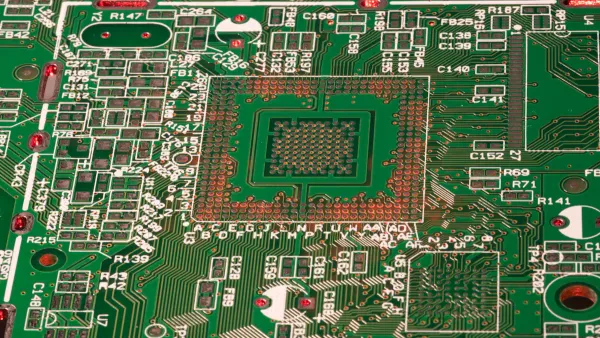
For most modern PCB designs, a ground plane is the best solution. A ground plane is a large, solid layer of copper dedicated entirely to ground. It offers several key advantages for your circuit.
A solid ground plane provides a low-impedance return path for all signals. High-frequency return currents naturally flow directly underneath their signal trace, minimizing the loop area and reducing inductance.
This makes your signals more stable and less prone to interference. A ground plane also helps with thermal management. The large copper area acts as a heat spreader, pulling heat away from hot components and distributing it across the board. This improves the reliability of your entire circuit.
You must define gnd as the anchor for your entire circuit. This single reference point dictates your circuit's stability, reliability, and safety. A solid ground provides the stable zero-volt reference point that all components need for proper operation.
Mastering ground techniques moves your projects from hobbyist to professional quality. Experts agree that a proper gnd connection is the most effective way to protect people and prevent equipment damage. Your successful circuit starts with a perfect ground.
FAQ
Can I use the negative terminal of my battery as ground?
Yes, you can. For a simple DC circuit, you use the battery's negative terminal as your 0V reference ground. This point becomes the common ground for your entire circuit. All components will use this ground connection as the return path for the circuit.
What is the difference between earth ground and circuit ground?
Earth ground connects to the physical earth for safety earth. This ground protects you from shock. Your circuit ground, or gnd, is the 0V reference inside your circuit. You often connect your circuit ground to the earth ground to create a stable system ground.
Why does my audio circuit have a humming sound?
A humming sound often points to a ground loop. This problem happens when your circuit has multiple ground paths. These paths create an antenna that picks up noise. You should ensure your system has a single, solid ground connection to fix this ground issue.
Is a bigger ground wire always better?
A thicker ground wire has lower resistance, which is good for your circuit's ground. It provides a better path for return current. For a PCB, a large ground plane is an excellent way to create a low-impedance ground for the whole circuit.